WordPress Plugin Venture
A free WordPress plugin that keeps your WooCommerce tax on an even keel. Tax set up right in 5 minutes, and kept right. No Jetpack, no subscription, no per-order fees.
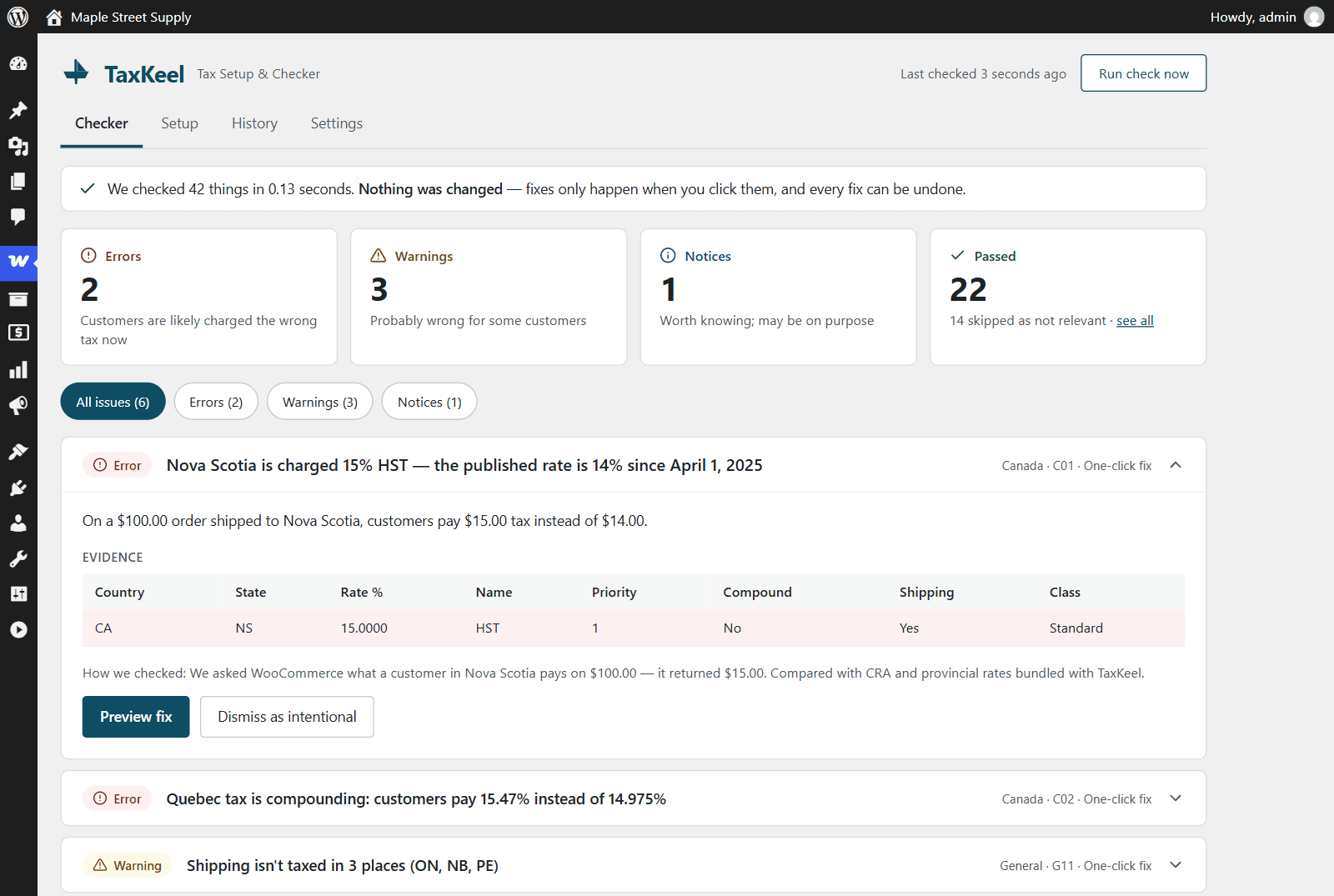
TaxKeel is a free WordPress plugin for WooCommerce stores, built by BrainFeed. It finds the mistakes in your WooCommerce tax setup - wrong or outdated rates, taxes that never apply, shipping that isn't taxed, rates that stack by mistake - and explains each one in plain English.
It runs 42 checks against your tax settings and rates. Rather than guessing, it asks WooCommerce's own tax engine what a customer in each place would pay, so what TaxKeel reports is what your checkout actually does. Each issue shows what's wrong, why it matters to your customers, and the exact rows or settings behind it.
The safe issues can be fixed in one click. Every fix shows a before-and-after preview, TaxKeel saves a snapshot of your tax settings first, and every change can be undone from History. Nothing changes unless you click.
TaxKeel checks your WooCommerce tax setup. It isn't tax advice.
"Taxes are not being calculated." "WooCommerce is using the store address instead." "The last update messed with my tax settings." We kept seeing the same WooCommerce tax problems on client stores, and almost all of them came down to setup mistakes that are easy to make and hard to spot.
The usual fixes mean a Jetpack connection, a monthly subscription, or per-order fees - a lot to ask of a small store that just needs WooCommerce's built-in tax set up correctly. We wanted a tool that gets tax set up right in 5 minutes and keeps it right, without any of that.
So we built TaxKeel: a plugin that keeps your tax on an even keel. It works entirely inside WordPress, ships its own rate data, and never sends anything about your store anywhere.
Finds wrong or outdated rates, taxes that never apply, untaxed shipping, duplicate or stacking rates, and settings changed by a WooCommerce update.
Every fix shows a before-and-after preview. A snapshot is saved first, and every change can be undone from History.
Answer a few questions and TaxKeel sets up WooCommerce's built-in tax for the EU (including OSS), UK, Canada, Australia, New Zealand and US state base rates.
Re-checks weekly, after WooCommerce updates, and when tax settings change. Emails only when something new is found, and warns 30 days before known rate changes.
Rate data ships inside the plugin. No account, no outside requests, and nothing about your store is sent anywhere.
Run checks, apply fixes, undo changes and read the history from the command line across the sites you manage.
TaxKeel has been submitted to the wordpress.org Plugin Directory and the listing is coming soon. Once it's approved, it will be a free install from Plugins > Add New in any WordPress admin.
Pro is coming soon, with a US economic nexus tracker, an EU same-price-everywhere mode, bulk tax-class tools, scheduled rate changes, agency reports and priority support. Get in touch and we'll let you know when TaxKeel and TaxKeel Pro are available.
Most WooCommerce tax problems we see on client stores aren't exotic - they're setup mistakes nobody noticed. Building TaxKeel meant cataloguing those mistakes, learning exactly how WooCommerce's tax engine resolves rates, and writing fixes that are safe to undo. That knowledge now goes into every WooCommerce build and audit we do.
TaxKeel is in review on wordpress.org. Send us a message and we'll let you know the moment you can install it.
