
TL;DR - Aelia's EU VAT Assistant for WooCommerce reached end of life on 30 June 2022. It still installs and still gets releases, but those releases only declare compatibility with new WooCommerce versions, apart from one security fix in October 2026: no support, no HPOS support and no new VAT rules. It was designed for the 2015 MOSS rules, before the July 2021 changes that extended MOSS into OSS and introduced IOSS for imports. Its one-click rate button still fetches a rate file last updated on 31 December 2020. Aelia itself recommends Simba Hosting's VAT compliance plugin, and there are other maintained options depending on which features you actually used. Move on a staging copy, keep the old order evidence, and check your rate table before and after.
About 5,000 WooCommerce stores still run EU VAT Assistant for WooCommerce, according to wordpress.org in October 2026. It has a 5.0 rating, and for years it was the free answer to EU VAT on WooCommerce: location evidence, VIES checks, VAT reports, all in one plugin. None of that has stopped working overnight. But the plugin's own listing now opens with a notice that it "reached its end of life on the 30th of June 2022", and the rules it was built for have changed since.
This guide is for moving off it calmly: what it did, what replaces each piece, and the order to do things in so you don't lose records along the way.
This article is for:
- WooCommerce stores with EU VAT Assistant active today, whether you use one feature or all of them
- Developers and agencies who inherited a store with it installed and need a migration plan
- Stores that filled in their EU rates with its one-click button and haven't touched them since
This article is NOT for:
- Stores that already moved to another VAT plugin - though the rate check further down is still worth two minutes
- Stores using an automated tax service (WooCommerce Tax, Avalara, TaxJar, Quaderno and similar) for EU VAT, where the service supplies the rates
- Anyone looking for a ruling on what they owe or how to file. That's for your accountant, and nothing here is tax advice
Where the plugin stands in 2026
Aelia announced the retirement in January 2022, in a post titled VAT OSS Compliance - From Aelia EU VAT Assistant to Simba Hosting's WooCommerce EU/UK VAT/IVA Compliance. The end-of-life date was 30 June 2022. The plugin listing says it is "still functional" but "no longer maintained or supported", and is kept available as a courtesy for users "who have developers who can take care of its maintenance".
What that means in practice, from the changelog:
- It still ships releases. Almost every release since 2022 reads "Declared compatibility with WooCommerce" plus a version number, with a few PHP 8 tweaks. The latest, 2.2.0.261001 on 5 October 2026, was a security fix: "Fixed vulnerability disclosed in CVE-2026-103899". If you're still running the plugin, make sure you're on that version.
- No new VAT features. Nothing has been added for OSS, IOSS or rate changes since the retirement. One release (2.1.26) removed the Irish Revenue exchange-rate integration because "the target service has changed significantly and the integration no longer works".
- No HPOS support. The plugin doesn't declare compatibility with WooCommerce's High-Performance Order Storage. Asked about it in the support forum, the author replied that there are "no plans to further update the plugin to support the HPOS storage" and recommended switching to an alternative (thread). So a store that keeps it is also staying on the older order storage.
So it isn't broken, and it isn't abandoned in the sense of being pulled. It's frozen. The sticky forum post puts it plainly: during this "grace period" Aelia "will no longer be able to add new features, or provide support".
What changed since it was designed
The plugin describes itself as built for "the new European VAT regulations, coming into effect on the 1st of January 2015" - the Mini One Stop Shop (MOSS) for digital services. On 1 July 2021 the EU changed that regime (European Commission):
- MOSS "has been extended to become a One Stop Shop (OSS)", covering distance sales of physical goods as well as services.
- The per-country distance-selling thresholds (EUR 35,000 or 100,000) were replaced by a single EU-wide threshold of EUR 10,000 a year (EC online sellers page). Below it, those sales "may be subject to VAT in the EU country where the taxable person is established" (Your Europe); above it, B2C customers in other EU countries generally pay their own country's VAT. The threshold has conditions, so check with your accountant how it applies to your store.
- IOSS, a separate new scheme, covers goods imported into the EU in consignments worth up to EUR 150.
Aelia chose to retire the plugin rather than rebuild it for these changes, and the announcement was framed around exactly that. The plugin's reports are still labelled for MOSS.
The rate button still uses 2020 rates
This is the part that affects stores that are otherwise happy with the plugin. The "update EU VAT rates" button on the WooCommerce tax screen fetches its rates from a file on GitHub, aelia-co/euvatrates.com. In version 2.2.0.261001 that is still the first source in the code (get_eu_vat_rates() in src/plugin-main.php), and the file's own last_updated field says 2020-12-31T23:21:00Z. Its last commit was on 12 April 2021.
We compared that file with the current EU rates on 29 September 2026. Four standard rates have changed since:
| Country | Button writes | Current standard rate | Changed |
|---|---|---|---|
| Estonia | 20% | 24% | 22% from 1 Jan 2024, 24% from 1 Jul 2025 |
| Finland | 24% | 25.5% | 1 Sep 2024 |
| Romania | 19% | 21% | 1 Aug 2025 |
| Slovakia | 20% | 23% | 1 Jan 2025 |
Several reduced rates in the file are no longer valid either: Czechia's 15% and 10% (merged into a single 12% reduced rate), Romania's 9% and 5% (replaced by 11% from 1 August 2025), Finland's 14% (13.5% from 1 January 2026), Slovakia's 10% and Lithuania's 9%. Current rates are published in the European Commission's TEDB database.
The button also adds a row for every country in its feed, and the feed includes the UK. The code adds Monaco (which uses French VAT) and the Isle of Man (which uses UK VAT) on top. Since Brexit, VAT for Great Britain and the Isle of Man is a separate decision from your EU setup, so a store that clicked the button after 2020 may have GB and IM rows sitting in its EU rate table. Northern Ireland is the exception to keep in mind: "the EU VAT rules will continue to apply in Northern Ireland for goods", and WooCommerce's Brexit guide suggests using the BT postcode prefix to set up its taxes separately.
Stores that typed their rates in by hand, or that update them some other way, aren't affected by this. But if the button is how your rates got there, check these rows first. This is read-only:
wp db query "SELECT tax_rate_id, tax_rate_country, tax_rate, tax_rate_class, tax_rate_name
FROM $(wp db prefix)woocommerce_tax_rates
WHERE tax_rate_country IN ('EE','FI','RO','SK','CZ','LT','GB','IM')
ORDER BY tax_rate_country, tax_rate_class;"
An empty tax_rate_class is the Standard class. Standard-class rows at the "Button writes" rate above are out of date. In other classes a matching number isn't automatically wrong, so compare it with the reduced rates listed above before changing it.
Should you move now?
If you rely on it for B2B VAT numbers, OSS reporting, or you want to switch on HPOS, yes, plan the move. Those are the parts where a frozen plugin and changed rules meet.
If you only ever used it to fill in rates once, the plugin itself isn't doing much for you anymore. Fix the rates, and you can remove it without a replacement or with a lighter one.
If most of your sales are domestic and your cross-border consumer sales are small, check whether you need a full EU VAT plugin at all. Below the EUR 10,000 threshold those sales may be taxed in your own EU country, but the threshold has conditions - confirm with your accountant before you simplify.
And if everything works and a developer maintains the store, there's no emergency. The plugin still runs. The risk grows slowly: the next rate change it won't know about, the next WooCommerce change it won't adapt to, and no one to ask when something looks wrong.
What each feature moves to
The plugin did five main jobs. Here's where each one can go. The four wordpress.org plugins below all had a release in September 2026 (Simba on 25 September, One Stop Shop on 21 September, WPFactory and Germanized on 14 September), and EU VAT Number is a paid extension sold on woocommerce.com. The notes come from each plugin's own listing, so check the free and paid tiers against what you need.
| What EU VAT Assistant did | Options that replace it |
|---|---|
| Location evidence - records IP country, billing and shipping country on each order | European VAT Compliance Assistant (Simba) records evidence in the free version; requiring two non-contradictory pieces with self-certification is Premium. EU VAT Number (Woo, paid) can collect self-declared location evidence for digital goods |
| VAT number field with VIES check, and removing VAT for B2B buyers whose sale qualifies | EU/UK VAT Validation Manager (WPFactory) - free, EU and UK numbers. Simba Premium (VIES, HMRC or VatSense). EU VAT Number (Woo, paid; no longer validates UK numbers). Germanized Pro has a VAT ID check |
| Dedicated VAT reporting currency and stored exchange rates | Simba (free) stores conversion rates with each order, from ECB, HMRC, Danish or Czech national banks |
| One-click EU rates | Simba (free) and One Stop Shop for WooCommerce (vendidero, free) both add or refresh EU rates. Whichever you use, check the result - see the TaxKeel section below |
| Reports - VAT by country (MOSS), VIES, INTRASTAT | Simba (free) reports for OSS/MOSS/IOSS, exportable as CSV. One Stop Shop (free) OSS reports plus EUR 10,000 threshold monitoring. EU VAT Number has an EC Sales List and EU VAT by State report. Germanized includes OSS support. None of the plugins we looked at advertises INTRASTAT reports; ask your accountant where that data comes from if you file it |
A few notes on picking:
- Aelia's own recommendation is Simba's plugin, now listed as European VAT Compliance Assistant for WooCommerce (3,000 active installs, 4.8 rating). It's the closest like-for-like replacement: evidence, currency conversion, rates and reports in one plugin, and it declares HPOS and checkout block support. Its code has a label for location data marked as coming from "Aelia EU VAT Assistant", but its listing doesn't document an import of Aelia's evidence, VAT numbers or reports, so don't count on one. The catch is that VAT number validation and B2B exemption are Premium features.
- If VAT numbers are the only thing you used, WPFactory's plugin (7,000 installs, 4.8) does that in the free version, EU and UK.
- If you're a German or EU-based shop that needs the legal setup too, Germanized (70,000 installs, 4.8) covers far more than VAT, and vendidero's One Stop Shop plugin (10,000 installs, 5.0) is the OSS piece on its own.
- Pick one VAT-number plugin. Two plugins adding VAT number fields to the same checkout can conflict: two fields, two validations, and two different answers on whether the order is exempt.
Install counts and ratings are from wordpress.org on 29 September 2026.
Before you switch: keep your records
EU VAT Assistant stores its evidence on each order, as order meta: _eu_vat_evidence, _eu_vat_data, the VAT number as vat_number, and the VIES result in _vat_number_validated, vies_response and vies_consultation_number. We read the plugin's code (version 2.2.0.261001): it has no uninstall routine that deletes this data, and deactivating it only clears a scheduled GeoIP update. So the data stays in your database after you switch it off.
What you lose is the plugin's view of it: the evidence panel on the order screen and the reports. Don't assume your new plugin reads Aelia's meta keys; none of the listings we read documents that. So before you deactivate:
- Export the reports you file from for every period you might still need. Keep them with your VAT records.
- Count what's stored, so you know what you're keeping. Because the plugin doesn't support HPOS, order data is almost certainly in the posts tables. Read-only:
wp db query "SELECT pm.meta_key, COUNT(DISTINCT pm.post_id) AS orders
FROM $(wp db prefix)postmeta pm
JOIN $(wp db prefix)posts p ON p.ID = pm.post_id
WHERE p.post_type = 'shop_order'
  AND pm.meta_key IN ('_eu_vat_evidence', '_eu_vat_data', 'vat_number',
                      '_vat_number_validated', 'vies_response', 'vies_consultation_number')
GROUP BY pm.meta_key;"
If your store already runs on HPOS, the same keys are in the wc_orders_meta table: count DISTINCT order_id there instead.
- Don't delete the meta afterwards to tidy up. It's the evidence for those orders.
When Aelia announced the retirement, it also offered help moving data to Simba's plugin through its contact form. If your records are complex, it's worth asking whether that still stands.
Step by step
- Make a staging copy of the store, with orders. Do everything below there first.
- Export reports and count the evidence (previous section).
- Install the replacement and configure it: VAT number field placement, B2B rules, reporting currency, OSS settings. Don't activate its rate import yet.
- Deactivate EU VAT Assistant. Do it before testing the new checkout, so you aren't testing two VAT number fields at once.
- Check the rate table. Look at every EU row in every tax class, not just Standard. Fix the rates the button wrote, and decide with your accountant whether the GB and IM rows belong there.
- Place test orders: a consumer in another EU country (should pay that country's VAT if you're over the threshold or registered for OSS), a business there with a valid VAT number, and one with an invalid number. The valid number should get the B2B treatment you and your accountant configured for sales that qualify; the invalid one should be charged VAT. A valid number is one condition, not the whole test: for goods, Your Europe says you don't charge VAT when the goods "are sent to another EU country" and "the customer has a valid EU VAT number".
- Open an old order and confirm the Aelia meta is still there, even though no plugin displays it.
- Repeat on the live store, at a quiet time.
- Treat HPOS as a separate project. While an incompatible plugin is active, WooCommerce disables the HPOS option. Once Aelia is gone and every active plugin declares HPOS support, take a backup and follow WooCommerce's HPOS guide: start with compatibility mode, which keeps orders synchronised to the posts table, and leave it on for a while before relying on the new tables.
- Keep checking the rates. Rates keep changing - Estonia has changed twice since 2024. Whatever plugin you choose, have something watch them.
Check your rates with TaxKeel (free)
We built a free plugin for step 5 and step 10: TaxKeel - Tax Setup & Checker for WooCommerce, on wordpress.org. It isn't a replacement for EU VAT Assistant. It runs alongside whichever VAT plugin you choose and checks the rate setup underneath it.
On an EU store it checks:
- EU standard rates are current, and reduced rates are valid for their country. It compares your rows with EU rate data from the European Commission's TEDB, bundled with the plugin, and re-runs the checks every week and whenever your tax settings change
- every EU country you sell to has a rate
- your cross-border consumer sales against the EUR 10,000 OSS threshold, as an estimate from your own orders
- prices shown to consumers include VAT, and whether EU shelf prices change by country
- whether you have B2B orders to other EU countries but no VAT-number plugin active
- whether an end-of-life tax plugin is still active. That's rule X03, and EU VAT Assistant is the plugin it looks for. It's a notice, not an error.

X03 on a test store with EU VAT Assistant active. It's a notice, not an error, and TaxKeel keeps checking your rates either way.
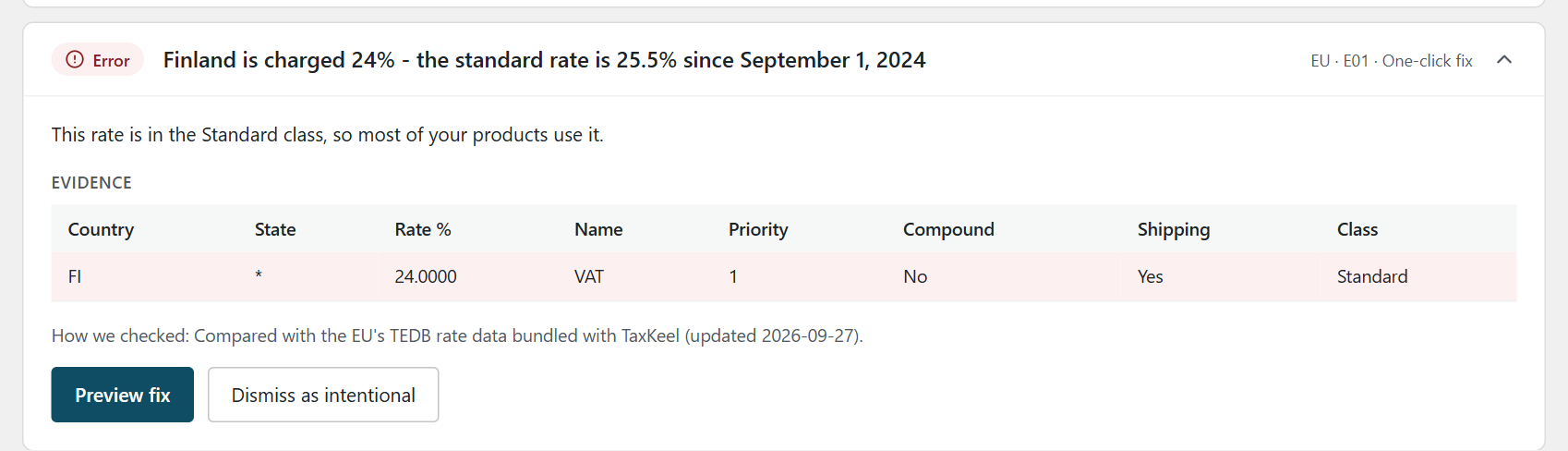
Finland at 24%, the rate the old button still writes. The finding shows the rate row behind it.
Outdated standard rates and missing countries have a one-click fix with a before-and-after preview. Each fix saves a snapshot first and can be undone from History. Where the right answer depends on your products, such as which reduced rate applies, it links you to the row instead of guessing.
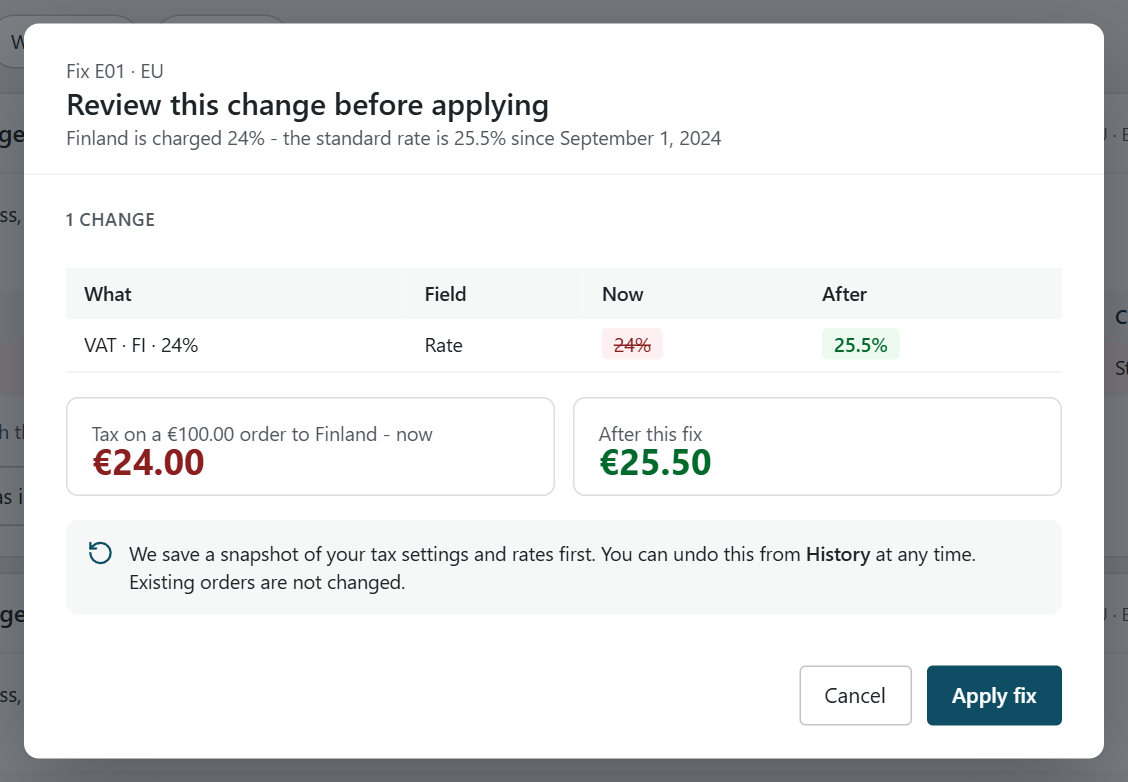
Nothing changes until you click Apply fix. Existing orders are not touched.
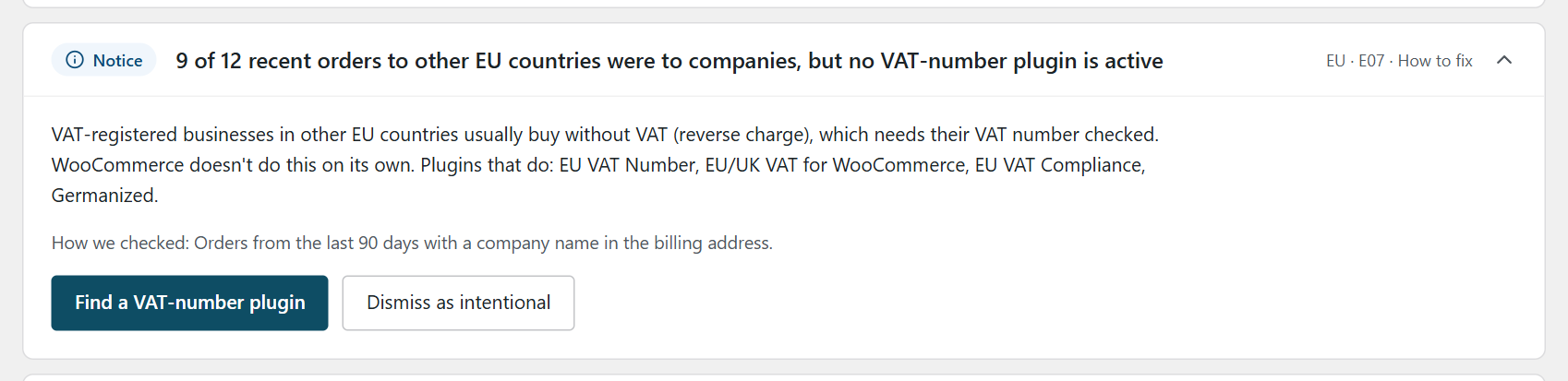
The same test store halfway through a migration, with EU VAT Assistant switched off and no replacement installed yet. If you forget step 3, this notice can flag it, as long as enough recent EU orders have a company name in the billing address.
What TaxKeel doesn't do, so you can plan around it: it doesn't validate VAT numbers against VIES, it doesn't zero-rate B2B orders, it doesn't collect location evidence, and it doesn't produce OSS, VIES or INTRASTAT reports. Those jobs belong to the VAT plugin you pick from the table above. TaxKeel checks the setup; it doesn't decide what you should charge.
It runs offline, needs no account, and wp taxkeel check runs the same checks from WP-CLI. More on the plugin, including the Pro version, on the TaxKeel page.
We've written about the same problem in Canada: Nova Scotia's HST dropped to 14% and many WooCommerce stores still charge 15%, because WooCommerce never updates a rate on its own.
FAQ
Is Aelia EU VAT Assistant still safe to use?
It still works, and it still gets compatibility releases for new WooCommerce versions. Its latest release (2.2.0, October 2026) fixed a disclosed security vulnerability, so if you keep it, keep it updated. But it has been unsupported since 30 June 2022, gets no new VAT rules, doesn't support HPOS, and its rate button uses rates from 2020. Aelia's own advice is to move to a maintained plugin. If you keep it for now, check your rates by hand or with a checker.
Will I lose my VAT evidence if I deactivate it?
Not from the database. The plugin (version 2.2.0.261001) has no routine that deletes its order meta when you deactivate or delete it. You lose its screens and reports, so export the reports you need first, and test on a staging copy.
Does TaxKeel validate VAT numbers?
No. TaxKeel checks your rate setup and tells you when B2B EU orders have no VAT-number plugin behind them. Validating numbers against VIES and applying the B2B treatment you've configured for qualifying sales is the job of a VAT-number plugin such as the ones in the table above.
What about the UK?
Since Brexit, Great Britain is outside the EU VAT area, and UK VAT is a separate registration and decision. Northern Ireland is different for goods: EU VAT rules still apply there, and businesses trading goods with the EU use VAT numbers starting with XI instead of GB (WooCommerce Brexit guide). If you sell goods to or from Northern Ireland, treat it as its own case, set up by BT postcode, and test an order to a BT postcode. For UK VAT numbers, WPFactory's plugin and Simba Premium can validate them; Woo's EU VAT Number extension no longer does. TaxKeel checks that UK rates are current and flags UK VAT charged on orders to EU countries. What you should charge UK customers is a question for your accountant.
Which replacement did Aelia recommend?
Simba Hosting's plugin, then called WooCommerce EU/UK VAT/IVA Compliance and now listed as European VAT Compliance Assistant for WooCommerce. The recommendation is in the end-of-life post pinned to the plugin's support forum.
This post explains how to move a WooCommerce setup from one plugin to another. It isn't tax advice - for decisions about what you charge, report and keep, talk to your accountant.
If you'd rather have someone do the move with you, we build and maintain WordPress and WooCommerce sites. And if you're weighing a move off WooCommerce altogether, read what to import, what to archive, and what breaks when moving to Shopify.