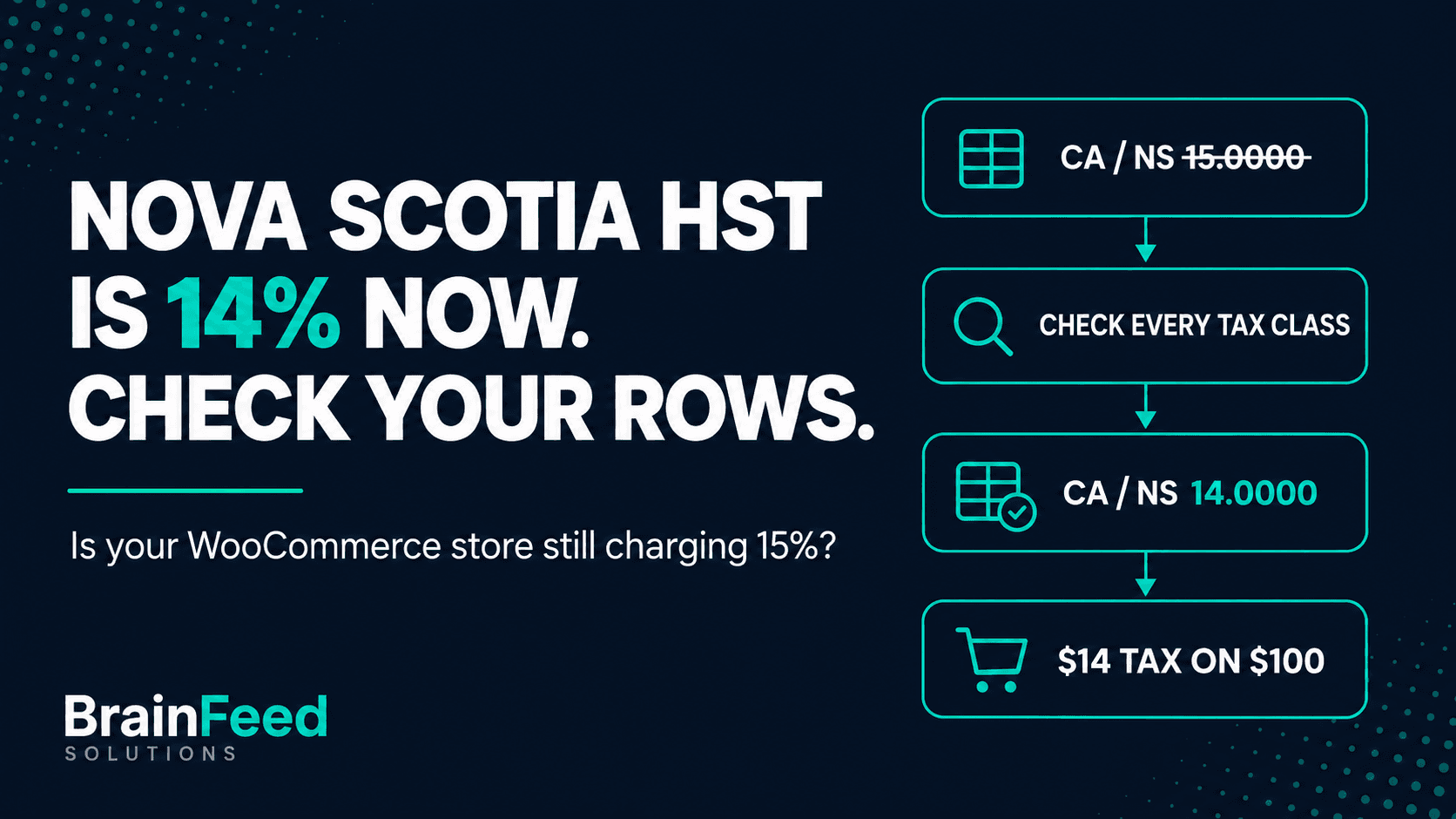
TL;DR - Nova Scotia's HST went from 15% to 14% on 1 April 2025. WooCommerce never changes its manual tax rates on its own, so if nobody has edited your Nova Scotia row since, it still charges 15% - wherever your store is based. Open WooCommerce > Settings > Tax, find every
CA/NSrow, and make sure it says14.0000.
WooCommerce's manual rate tables have no update feed and no admin notice. The number in your table is whatever someone typed or imported when the store was set up.
This article is for:
- WooCommerce stores registered for GST/HST that sell to customers in Nova Scotia, wherever the store is based
- Developers and agencies who maintain WooCommerce stores for Canadian clients
- Store owners who set up Canadian tax rates once, from a CSV or a tutorial, and haven't looked at them since
This article is NOT for:
- Stores that use an automated tax service (WooCommerce Tax, Avalara, TaxJar and similar) for Canadian rates - your rates come from the service, so check its settings instead
- Small suppliers under the CAD 30,000 threshold who aren't registered and don't charge GST/HST at all
- Anyone looking for advice on what to do about tax already collected - that's a conversation for your accountant
What changed, and when
From 1 April 2025, the HST rate in Nova Scotia is 14%: the 5% federal part plus a provincial part that went from 10% to 9%. Before that date it was 15%.
The source is CRA Notice 342, which ties the rate to when the HST became due or was paid. For a store where the customer pays at checkout, orders paid on or after 1 April 2025 carry 14%. Deposits, pre-orders and invoices with payment terms have their own rules in the notice.
Who is affected
- Stores based in Nova Scotia.
- Any GST/HST-registered store that ships goods to Nova Scotia. When the supplier delivers goods to the customer, the CRA's place-of-supply rules put the supply in the province where the goods are delivered. So an Ontario store shipping to a Nova Scotia customer charges 14% HST, not Ontario's 13%. Pickups, services and digital products follow different rules; that page covers them.
On a CAD 100 order, that's CAD 15 of tax instead of CAD 14, on every taxable Nova Scotia order that used the old row.
How to check in WooCommerce
WooCommerce keeps rates per tax class, and each class (Standard, Reduced rate, Zero rate, any custom class) has its own table.
-
Go to WooCommerce > Settings > Tax.
-
Open Standard rates. Look for every row with Country code
CAand State codeNS. The Rate % column should read14.0000.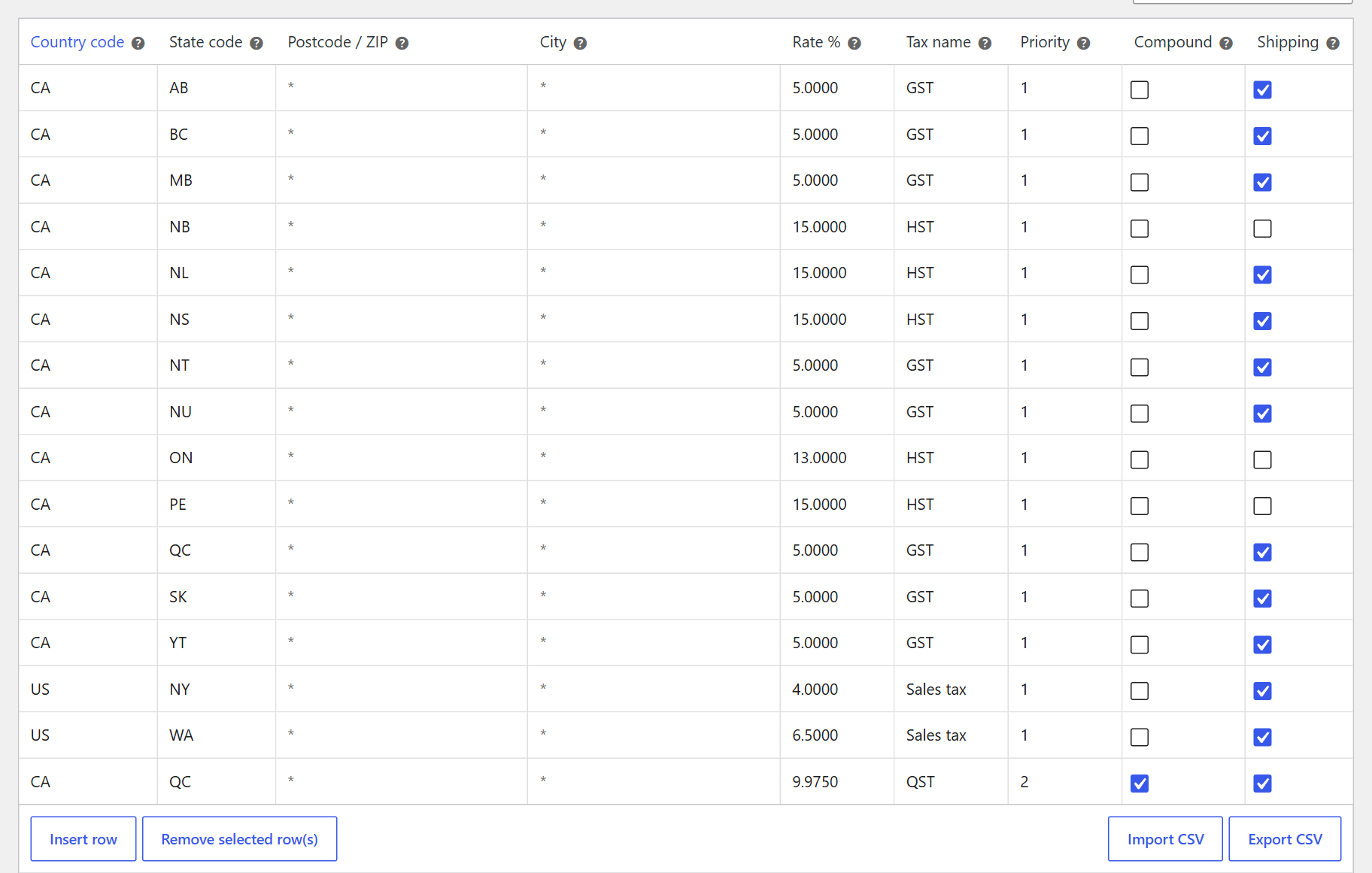
A typical Canadian rate table set up before April 2025. The CA / NS row still reads 15.0000.
-
Repeat for every other tax class listed at the top of the Tax tab.
-
Check for rows with a value in the Postcode / ZIP or City columns. A postcode-specific
NSrow for Halifax (B3H*, say) is matched before the generalNSrow at the same priority. A row at a different priority is applied on top, so check the Priority column too. -
Shipping tax depends on three settings, not one: the Shipping checkbox on the rate row, the Shipping tax class option on the Tax tab, and the Tax status of each shipping method. Changing the rate doesn't touch them; confirm they match what you intend.
With a lot of rows, the database is faster than scrolling. This is read-only:
wp db query "SELECT r.tax_rate_id, r.tax_rate_class, r.tax_rate, r.tax_rate_name, r.tax_rate_shipping,
  GROUP_CONCAT(l.location_code) AS postcodes
FROM $(wp db prefix)woocommerce_tax_rates r
LEFT JOIN $(wp db prefix)woocommerce_tax_rate_locations l
  ON l.tax_rate_id = r.tax_rate_id AND l.location_type = 'postcode'
WHERE r.tax_rate_country = 'CA' AND r.tax_rate_state = 'NS'
GROUP BY r.tax_rate_id;"
An empty tax_rate_class is the Standard class. Anything showing 15.0000 needs fixing.
How to fix it
In the admin, click the rate cell, change 15.0000 to 14.0000, and click Save changes. Do it for every row the check turned up.
From WP-CLI, using the tax_rate_id from the query (the user needs permission to manage WooCommerce):
wp wc tax update 42 --rate=14.0000 --user=admin
Then run a test cart with a Nova Scotia shipping address and a known subtotal, and confirm the tax amount: CAD 14 on a CAD 100 taxable subtotal, before shipping.
Three places the fix doesn't reach on its own:
- CSV files. If you imported rates from a CSV, the old file still says 15, and the next re-import puts the problem back. Update or delete it.
- Subscriptions. WooCommerce Subscriptions does not apply a changed tax rate to existing subscriptions; their renewals keep the old tax until someone edits the subscription and recalculates its totals (how to update an existing subscription).
- Orders already placed. Orders paid since 1 April 2025 may have been charged 15%. Whether to adjust or refund them is a question for your accountant.
Or let a checker find it
We built a free plugin for this kind of drift: TaxKeel - Tax Setup & Checker for WooCommerce, on wordpress.org.
Its checker asks WooCommerce's own tax engine what a customer in each province would pay, and compares that with published rates bundled in the plugin. A Nova Scotia row still at 15% shows up under rule C01 ("Canadian province totals match published rates"), with the row behind it and what a customer pays on a CAD 100 order.
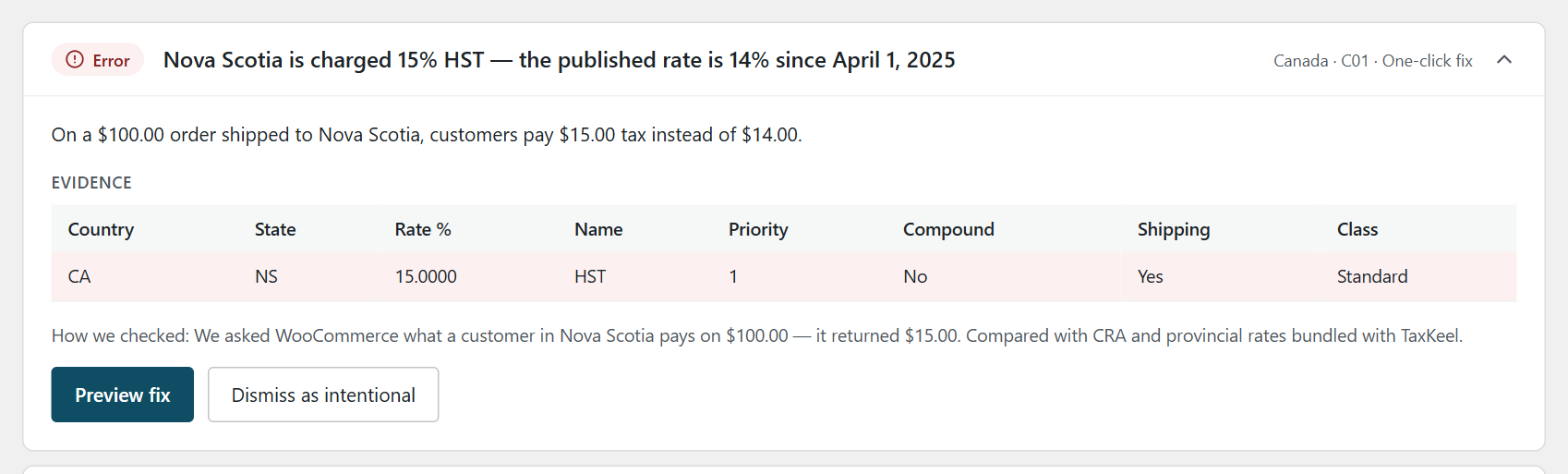
The C01 finding on a test store: the tax a Nova Scotia customer pays on a $100 order, and the rate row behind it.
When the cause is a single HST row at the old rate, TaxKeel offers a fix. It shows a before-and-after preview, saves a snapshot of your tax settings first, and can be undone from History. If the setup is more tangled (several overlapping rows, for example), it points you to the setup wizard instead of guessing. C01 checks the Standard class, so the other classes are still yours to check by hand.
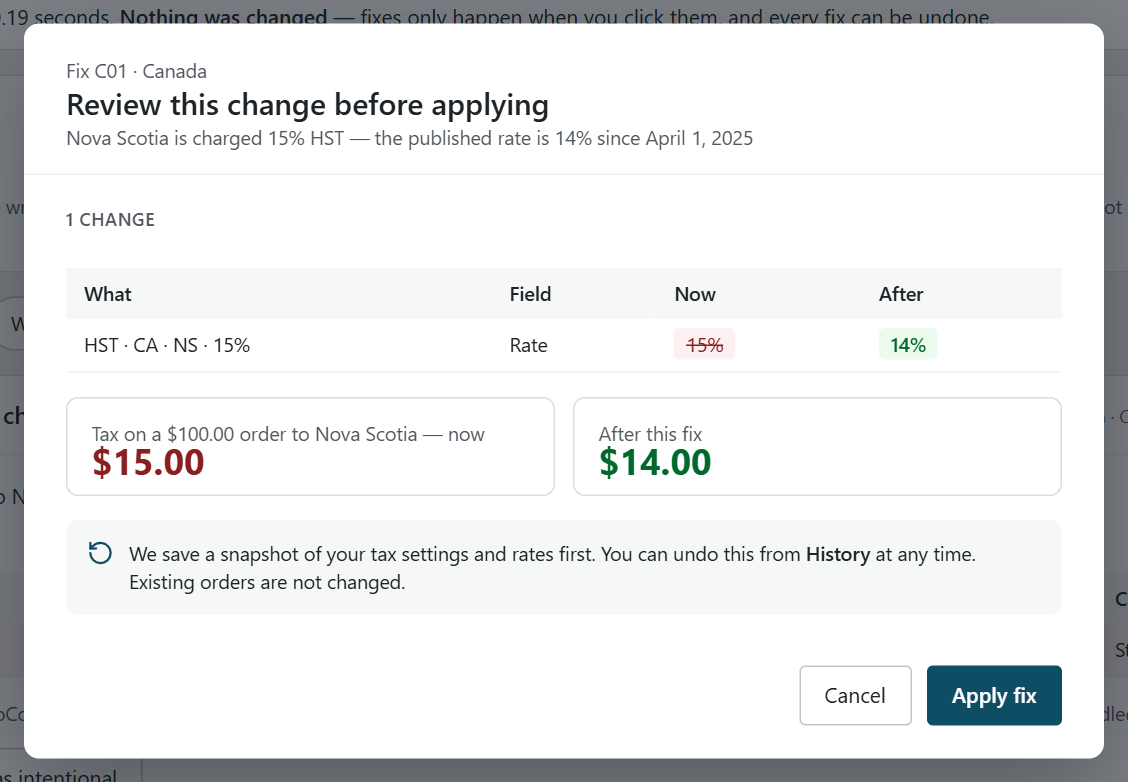
Nothing changes until you click Apply fix, and existing orders are not touched. Every fix then appears in History with an Undo button.
The same run flags provinces with no rate at all and Quebec QST set to compound (15.47% instead of 14.975%). More on the plugin, including Pro, on the TaxKeel page.
When you don't need it: if you just fixed one Nova Scotia row by hand in a single tax class, you're done. A checker earns its place with several classes, postcode rows, or a store other people edit. It checks the setup; you and your accountant decide what you charge.
Canadian sales tax rates at a glance
Rates in effect on 29 September 2026, from the CRA GST/HST rates page and provincial tax authorities.
| Province / territory | Tax | Rate | WooCommerce rows |
|---|---|---|---|
| Nova Scotia | HST | 14% | 1 row (15% until 31 March 2025) |
| New Brunswick, Newfoundland and Labrador, Prince Edward Island | HST | 15% | 1 row each |
| Ontario | HST | 13% | 1 row |
| British Columbia | GST + PST | 5% + 7% | GST, plus PST if registered for it |
| Manitoba | GST + RST | 5% + 7% | GST, plus RST if registered for it |
| Saskatchewan | GST + PST | 5% + 6% | GST, plus PST if registered for it |
| Quebec | GST + QST | 5% + 9.975% | GST, plus QST not compound (14.975% total) |
| Alberta, Northwest Territories, Nunavut, Yukon | GST | 5% | 1 row each |
WooCommerce applies at most one matching row per priority. Where two taxes apply, put GST at priority 1 and the provincial tax at priority 2, with Compound unchecked.
FAQ
What is the HST rate in Nova Scotia?
14%, since 1 April 2025: the 5% federal part plus a 9% provincial part. Before that it was 15%. Source: CRA Notice 342.
Does WooCommerce update tax rates automatically?
Not the rates you enter under WooCommerce > Settings > Tax. When a province changes its rate, someone has to edit those rows. Automated tax services such as WooCommerce Tax supply rates themselves.
My store is in Ontario. Do I need a Nova Scotia rate?
If you're registered for GST/HST and ship goods to Nova Scotia customers, yes. Goods delivered to Nova Scotia are taxed at Nova Scotia's 14% HST.
This post explains how to check a WooCommerce setup. It isn't tax advice - for decisions about what you charge and report, talk to your accountant.
If your WooCommerce store needs more than a rate fix, we also build and maintain WordPress and WooCommerce sites. If you're weighing a move off WooCommerce altogether, read what to import, what to archive, and what breaks when moving to Shopify, and Stripe vs Shopify Payments for how payments change on the other side.