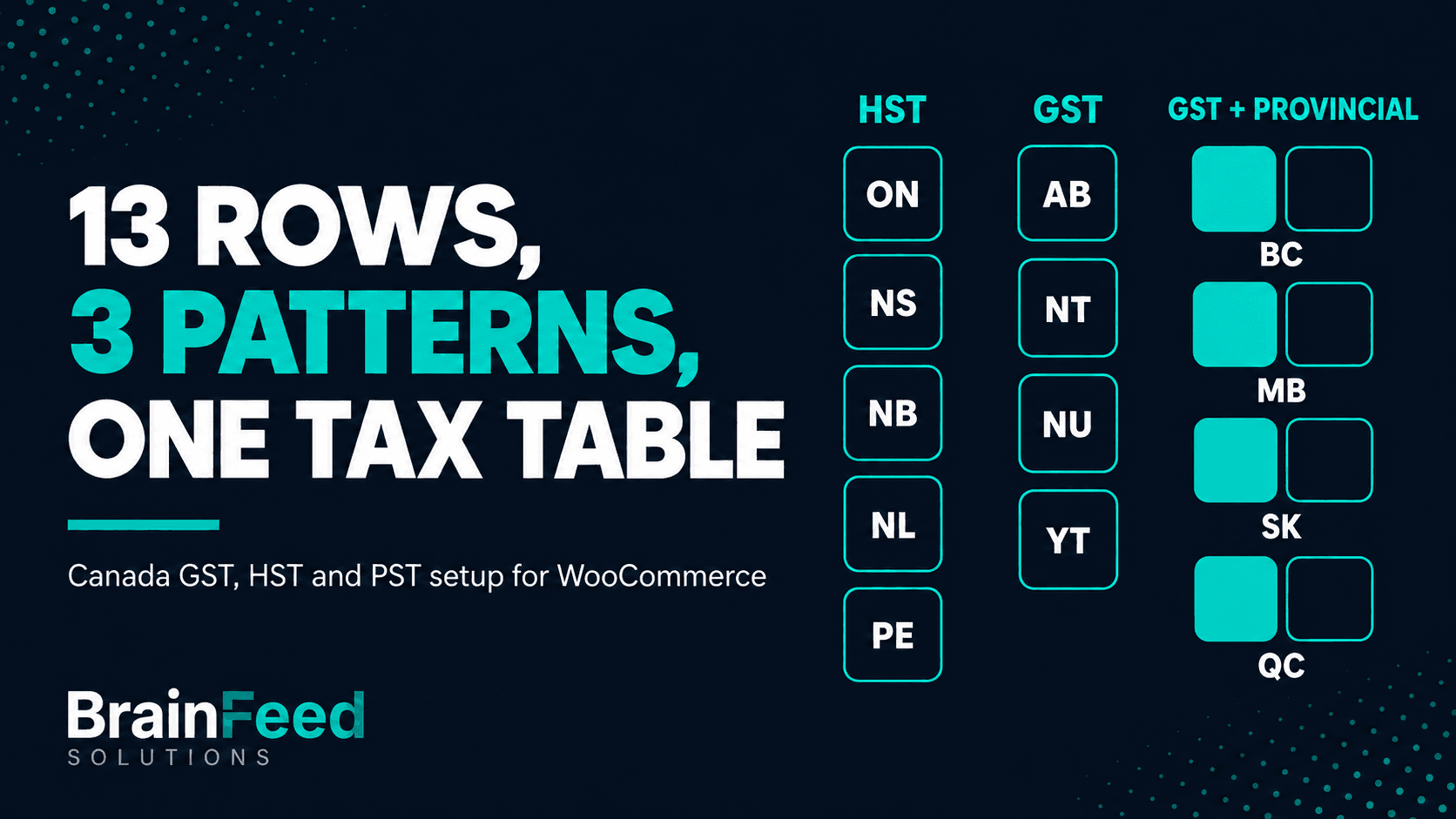
TL;DR - If you're registered for GST/HST, WooCommerce needs a rate for all 13 provinces and territories, because you charge the rate of the province the goods are delivered to. That's 13 rows at priority 1: HST in Ontario (13%), Nova Scotia (14%), New Brunswick, Newfoundland and Labrador and Prince Edward Island (15%), and GST at 5% everywhere else. Provincial taxes (BC PST, Manitoba RST, Saskatchewan PST, Quebec QST) are separate registrations: add a second row at priority 2 only for the provinces you're registered in, with Compound unticked. Set tax to follow the customer's shipping address, show tax totals itemized, and test one checkout per pattern.
WooCommerce doesn't know any of this. Its tax table is whatever you typed or imported, and it stays that way until someone changes it. This guide builds the Canadian table from the ground up, with the official source for every rate.
This article is for:
- WooCommerce stores that sell physical goods to customers in more than one Canadian province
- Developers and agencies setting up or auditing tax tables for Canadian clients
- Store owners who set up one province (their own) and suspect the rest is missing or out of date
This article is NOT for:
- Stores that use an automated tax service (WooCommerce Tax, Avalara, TaxJar and similar) for Canadian rates - check that service's settings instead
- Digital products, services and marketplace sellers: the place-of-supply and registration rules differ from the physical-goods case here
- Anyone deciding whether they need to register for a tax - that's for the tax authority or your accountant
The three row patterns
Every province and territory falls into one of three patterns. Standard headline rates as checked on 13 October 2026 (re-checked on the publish date), from the CRA GST/HST rates page and each province's tax authority:
| Province / territory | Code | Tax | Rate | WooCommerce rows |
|---|---|---|---|---|
| Ontario | ON | HST | 13% | 1 row, priority 1 |
| Nova Scotia | NS | HST | 14% | 1 row, priority 1 (15% until 31 March 2025) |
| New Brunswick | NB | HST | 15% | 1 row, priority 1 |
| Newfoundland and Labrador | NL | HST | 15% | 1 row, priority 1 |
| Prince Edward Island | PE | HST | 15% | 1 row, priority 1 |
| British Columbia | BC | GST + PST | 5% + 7% | GST at priority 1; PST at priority 2 only if registered for PST |
| Manitoba | MB | GST + RST | 5% + 7% | GST at priority 1; RST at priority 2 only if registered for RST |
| Saskatchewan | SK | GST + PST | 5% + 6% | GST at priority 1; PST at priority 2 only if registered for PST |
| Quebec | QC | GST + QST | 5% + 9.975% | GST at priority 1; QST at priority 2 only if registered for QST |
| Alberta | AB | GST | 5% | 1 row, priority 1 |
| Northwest Territories | NT | GST | 5% | 1 row, priority 1 |
| Nunavut | NU | GST | 5% | 1 row, priority 1 |
| Yukon | YT | GST | 5% | 1 row, priority 1 |
Provincial sources: BC PST (PST 302), Manitoba RST (Bulletin RST 030), Saskatchewan PST (Information Bulletin PST-5), Quebec QST (Revenu Quebec). These are headline rates: exemptions and zero-rated goods vary by product, and this guide doesn't cover them.
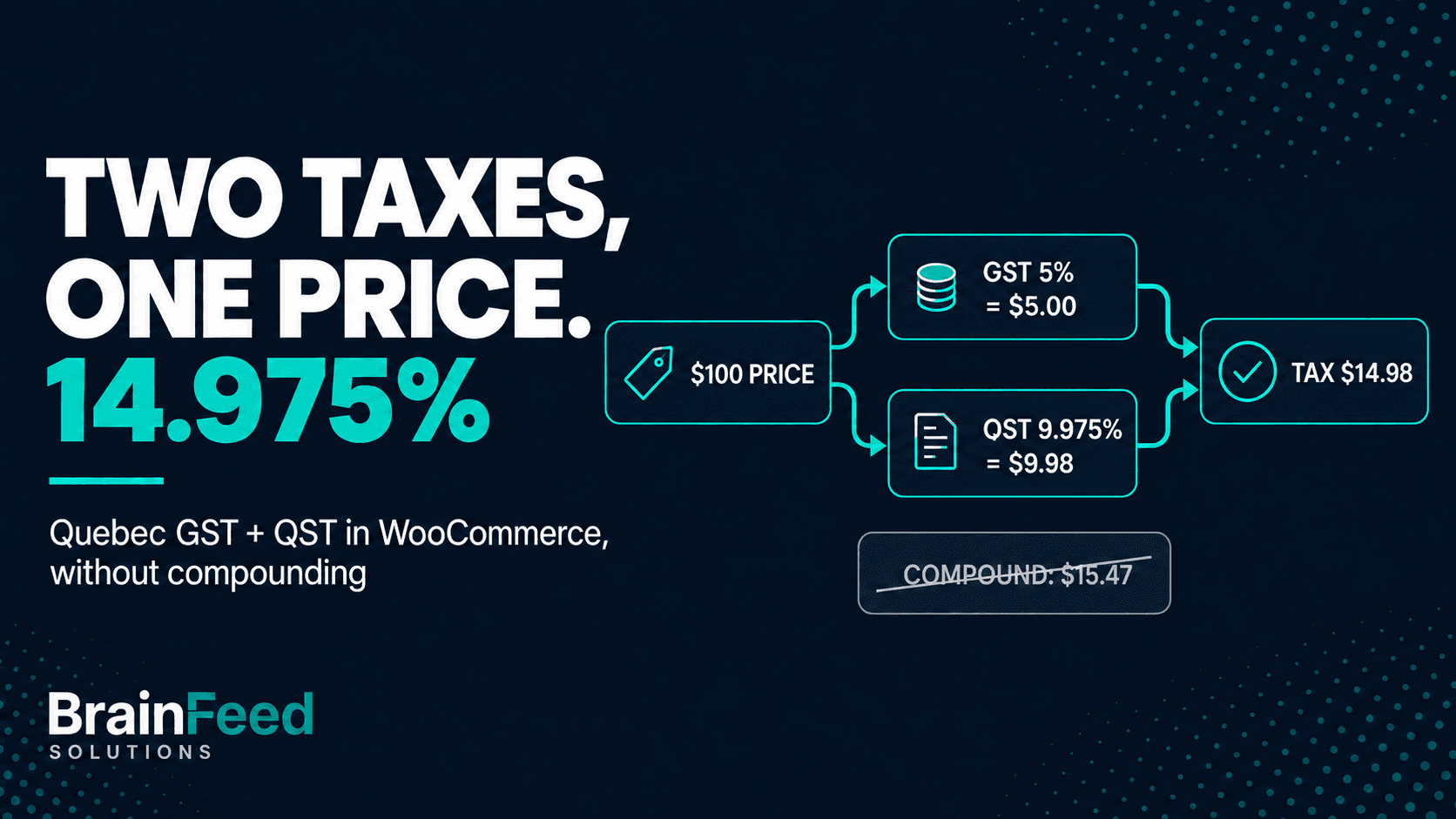
No Canadian rate compounds. Quebec stopped charging QST on top of GST on 1 January 2013, and a QST row left on Compound charges 15.47% instead of 14.975% - the Quebec walkthrough covers that one in detail.
Before you add a row: which taxes you're registered for
The table above is what the rates are. Which rows belong in your table depends on what you're registered for, and GST/HST and the provincial taxes are separate questions.
GST/HST. For goods, the CRA's place-of-supply rules say "the place of supply is the province in which the goods are delivered". A GST/HST registrant in Ontario shipping to Nova Scotia charges Nova Scotia's 14%; shipping to Alberta, 5% GST. That's why the table needs all 13 provinces and territories, not just your own.
The usual exception is the small supplier: if your worldwide taxable supplies, together with those of associated persons, stay at or below $30,000 in a single calendar quarter and over the last four consecutive quarters, you don't have to register. The CRA's RC4022 is direct about the other side: "If you choose not to register, you do not charge the GST/HST". An unregistered store shouldn't have GST/HST rows at all. The CRA's registration page explains when the obligation starts once you pass the threshold.
Provincial taxes are separate registrations, each with its own rules for sellers based in another province:
- British Columbia (PST 7%). Bulletin PST 001 (revised October 2026) lists several ways a seller elsewhere in Canada becomes required to register. One is selling and delivering taxable goods to BC customers with more than $10,000 of BC revenue in the previous or next 12 months. Another applies at any revenue: delivering into BC and soliciting BC customers, for example with ads aimed at BC. A website that doesn't target BC customers isn't soliciting, by the bulletin's own note.
- Saskatchewan (PST 6%). Information Bulletin PST-5 (revised July 2025): businesses outside Saskatchewan that make retail sales in the province - making goods available there, accepting orders from there and delivering there - must be licensed to collect PST. It also says "Small trader guidelines do not apply to non-resident vendors."
- Manitoba (RST 7%). Bulletin RST 004 (revised June 2024): an out-of-province business that delivers taxable goods into Manitoba, solicits orders there "by advertising or any other means" and accepts orders from Manitoba, including online, must register and collect RST. The bulletin's $30,000 small-business exemption doesn't extend to out-of-province businesses that haven't paid Manitoba RST on goods they buy for resale in Manitoba.
- Quebec (QST 9.975%). Revenu Quebec's specified QST system applies to suppliers outside Quebec registered under the general GST/HST system whose taxable supplies to specified Quebec consumers pass $30,000 in a 12-month period.
Selling only through a marketplace that collects the tax changes the picture in BC, Saskatchewan and Manitoba; the bulletins above cover that case.
Whether any of these applies to you is a question for the province, Revenu Quebec or your accountant. This guide assumes you already know, and shows how to set up the rows once you do.
WooCommerce settings first
Five settings decide how the rows behave. They're on WooCommerce > Settings > Tax (the tab appears once Enable tax rates and calculations is ticked under WooCommerce > Settings > General).
| Setting | Set it to | Why |
|---|---|---|
| Prices entered with tax | No, I will enter prices exclusive of tax | Canadian shelf prices are normally shown before tax, and with a different rate in every province, a tax-exclusive price is the one number that stays fixed |
| Calculate tax based on | Customer shipping address | GST/HST follows the province the goods are delivered to; billing address is the wrong signal when someone ships a gift to another province |
| Shipping tax class | Shipping tax class based on cart items | Shipping then uses the same rows as the products in the cart |
| Rounding | Leave unticked (round per line) unless your accountant prefers subtotal rounding | Changes the cent in some totals; pick one and keep it |
| Display tax totals | Itemized | Shows GST and PST (or QST) as separate lines on the cart, checkout and order emails |
Itemized matters more in Canada than in most places: a customer in BC or Quebec pays two taxes, and Revenu Quebec says the combined 14.975% rate must not appear on the document attesting to the sale. With As a single total, both taxes collapse into one "Tax" line.
Building the rate table, step by step
WooCommerce keeps rates per tax class. Standard rates is the default class; Reduced rate, Zero rate and any custom class each have their own table.
- Open WooCommerce > Settings > Tax > Standard rates.
- Add one row per province and territory: Country code
CA, State code from the table above (AB,BC,MB,NB,NL,NS,NT,NU,ON,PE,QC,SK,YT), Postcode and City left blank (they show as*), the GST or HST rate, Tax nameGSTorHST, Priority 1. - For each province where you're registered for the provincial tax, add a second row: same country and state, the PST, RST or QST rate, the tax's name, Priority 2.
- Leave Compound unticked on every row.
- Tick Shipping on each row where delivery charges are taxed (next section), and save.
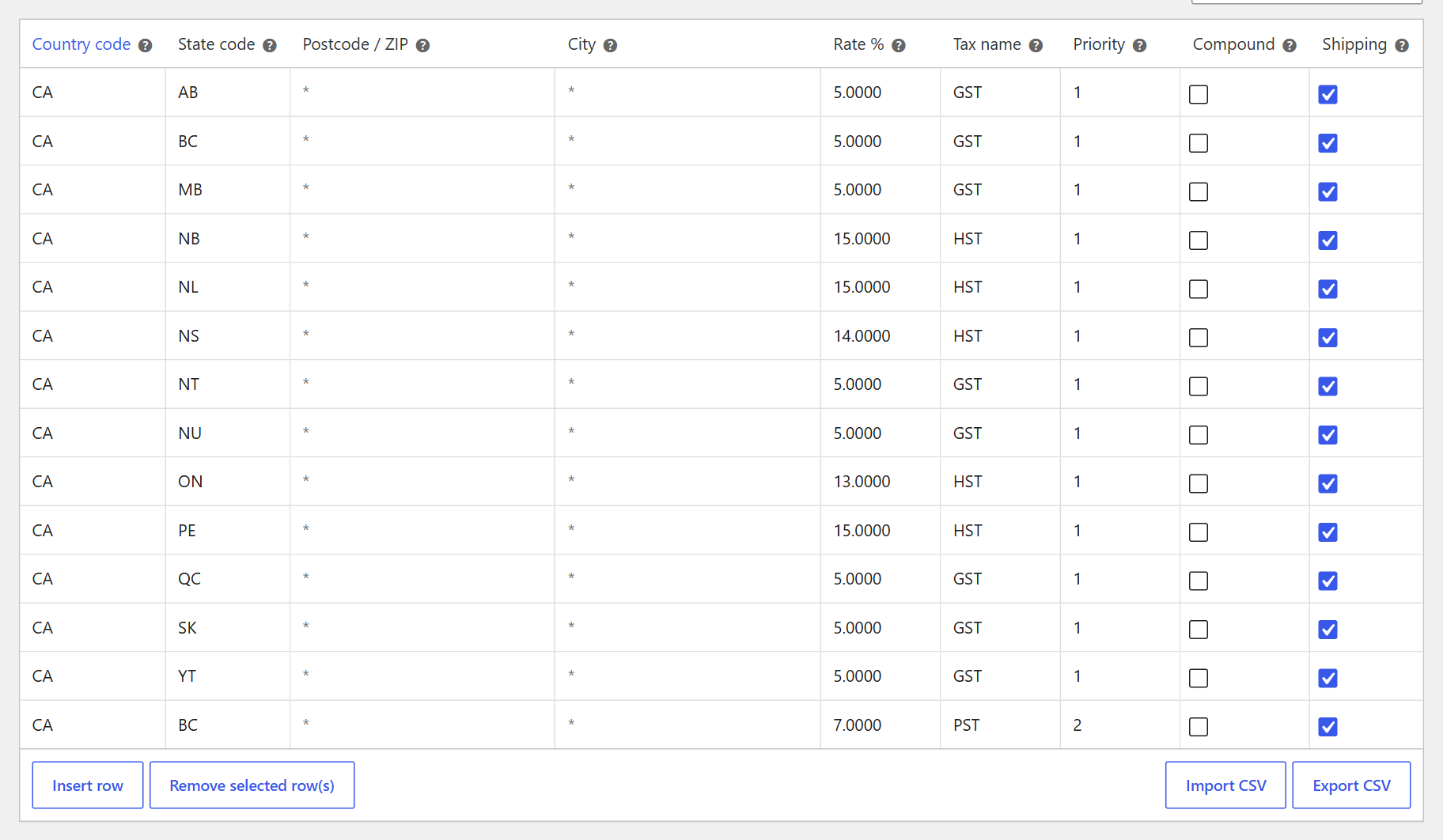
A GST/HST-registered store also registered for BC PST: 13 rows at priority 1, one at priority 2.
Why priority 2, not priority 1. WooCommerce applies at most one matching row per priority. Two BC rows at priority 1 means only the first one matches, and the customer pays GST or PST, not both. Priority 2 makes the provincial row a second, independent tax on the same price.
Why Compound stays off. Compound charges a row on the price plus the taxes from lower priorities. No Canadian provincial tax works that way today, so a compound PST row charges 7% of $105 instead of 7% of $100.
Other tax classes. If some products use Reduced rate, Zero rate or a custom class, that class needs its own Canadian rows, or WooCommerce charges those products nothing. Which products belong in which class is a product-by-product question this guide doesn't answer.
Postcode and city rows. A row with a postcode is matched before the general row at the same priority. Most Canadian stores don't need any; if you inherited some, check they carry current rates.
Importing the table as a CSV
Typing 13 to 17 rows by hand invites a typo. WooCommerce imports rates from a CSV in its own format: 10 columns, a header row, one rate per line. This file is the GST/HST part. GST/HST registration is federal, so a registrant needs the destination rate for every province and territory:
Country code,State code,Postcode / ZIP,City,Rate %,Tax name,Priority,Compound,Shipping,Tax class
CA,AB,,,5.0000,GST,1,0,1,
CA,BC,,,5.0000,GST,1,0,1,
CA,MB,,,5.0000,GST,1,0,1,
CA,NB,,,15.0000,HST,1,0,1,
CA,NL,,,15.0000,HST,1,0,1,
CA,NS,,,14.0000,HST,1,0,1,
CA,NT,,,5.0000,GST,1,0,1,
CA,NU,,,5.0000,GST,1,0,1,
CA,ON,,,13.0000,HST,1,0,1,
CA,PE,,,15.0000,HST,1,0,1,
CA,QC,,,5.0000,GST,1,0,1,
CA,SK,,,5.0000,GST,1,0,1,
CA,YT,,,5.0000,GST,1,0,1,
Provincial rows go in a second file, and only the lines for the provinces you're registered in:
Country code,State code,Postcode / ZIP,City,Rate %,Tax name,Priority,Compound,Shipping,Tax class
CA,BC,,,7.0000,PST,2,0,1,
CA,MB,,,7.0000,RST,2,0,1,
CA,SK,,,6.0000,PST,2,0,1,
CA,QC,,,9.9750,QST,2,0,1,
The Shipping column in the provincial file is a decision per province, not a default - read the shipping section before importing it. An empty Tax class means Standard rates.
To import: WooCommerce > Settings > Tax > Standard rates > Import CSV, choose the file, and run the importer. Two things that catch people out:
- Import adds rows; it never replaces them. WooCommerce's importer inserts every line as a new row. Importing over an old table leaves both, and since only one row per priority applies, an old
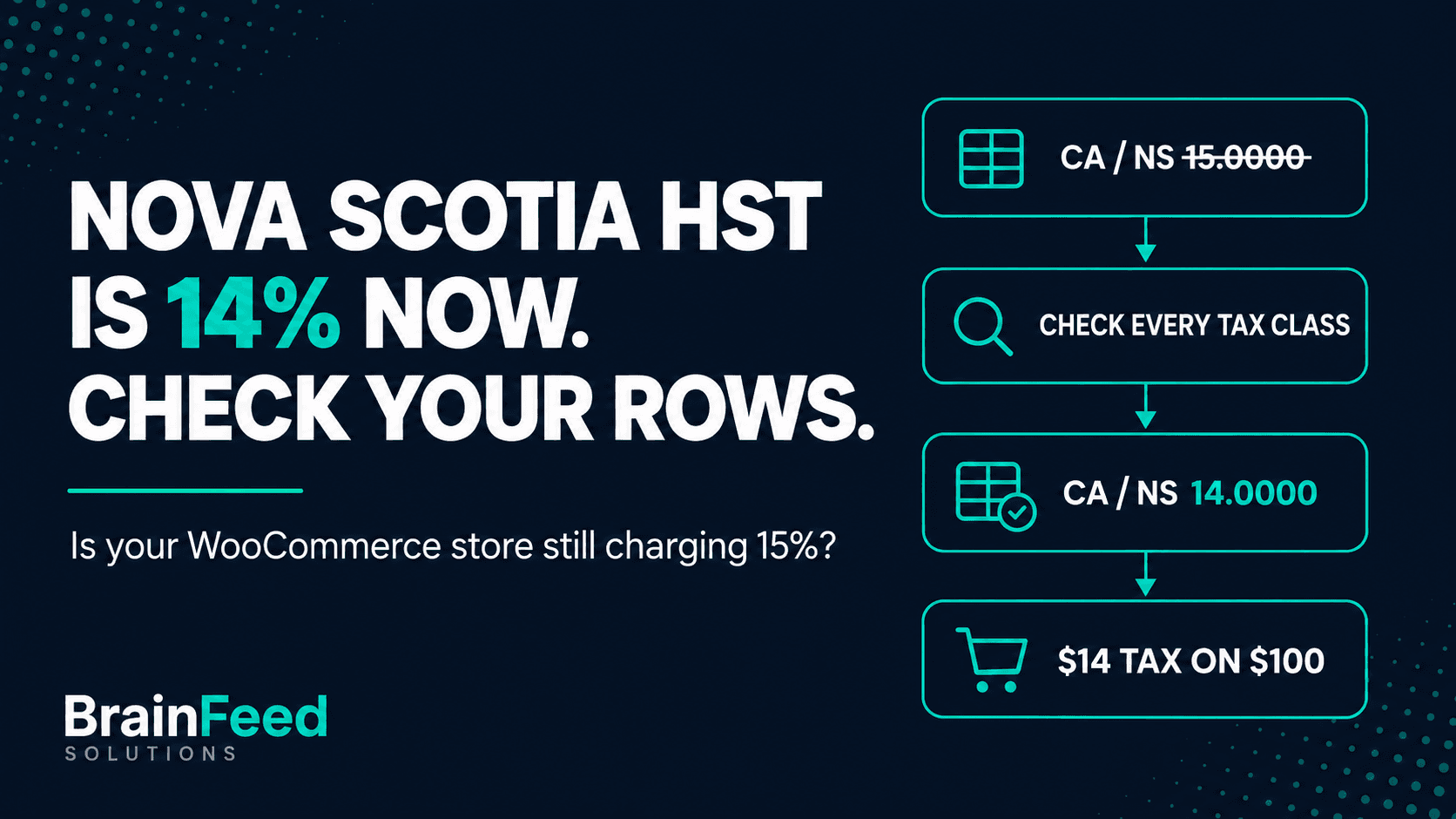
NS 15.0000row can keep winning. Click Export CSV first as a backup, then remove the old Canadian rows, then import. - Old rate files are the usual source of stale rows. A CSV saved before April 2025 still has Nova Scotia at 15% (the Nova Scotia post shows how to find and fix it), and files from before 2013 carry Quebec's compound QST.
We imported both files into a clean table on a WooCommerce 11.1.2 test store: 13 rows, then 4 more, no errors, and the totals in the testing section below.
Shipping, province by province
The Shipping box on each row decides whether that rate also applies to delivery charges. The answer isn't the same for every tax.
- GST/HST. The CRA's info sheet GI-202 says that where a merchant supplies the goods and the delivery together as a single supply, "the GST/HST generally follows the tax treatment of the goods". Whether delivery is part of a single supply is a question of fact, but for the usual shop that ships what it sells, that's the reading behind ticking Shipping on every GST/HST row.
- British Columbia PST. Taxable in the usual case. PST 302 says PST applies to delivery charges incurred at or before title transfers, and for goods delivered from outside BC to a BC purchaser, title timing doesn't matter. Exempt goods carry no PST on their delivery charge.
- Saskatchewan PST. Depends on where you ship from. Under IN 2023-04, freight is taxable when goods ship from outside Saskatchewan, whether or not it's billed separately. Shipped from inside Saskatchewan, it isn't taxable if it's described as delivery, added to the selling price, and "reasonable and segregated on the invoice". A store outside Saskatchewan ticks Shipping on its SK PST row; a store inside it usually doesn't.
- Manitoba RST. No bulletin addresses seller-billed delivery for an ordinary online store. The Retail Sales Tax Act counts "any charge whatsoever in connection with the transaction" in the purchase price, and excludes delivery charges only where the seller regularly sells the goods for delivery at its own premises and itemizes the charge. How that applies to your store is a question for Manitoba Finance or your accountant.
- Quebec QST. We couldn't confirm the treatment of seller-billed delivery on Revenu Quebec's pages, so we're not making a claim. Check with Revenu Quebec or your accountant before you set the QST row's Shipping box.
Where the BC and CRA guidance addresses mixed carts, the delivery charge is apportioned between the goods, so delivery on exempt goods isn't taxed.
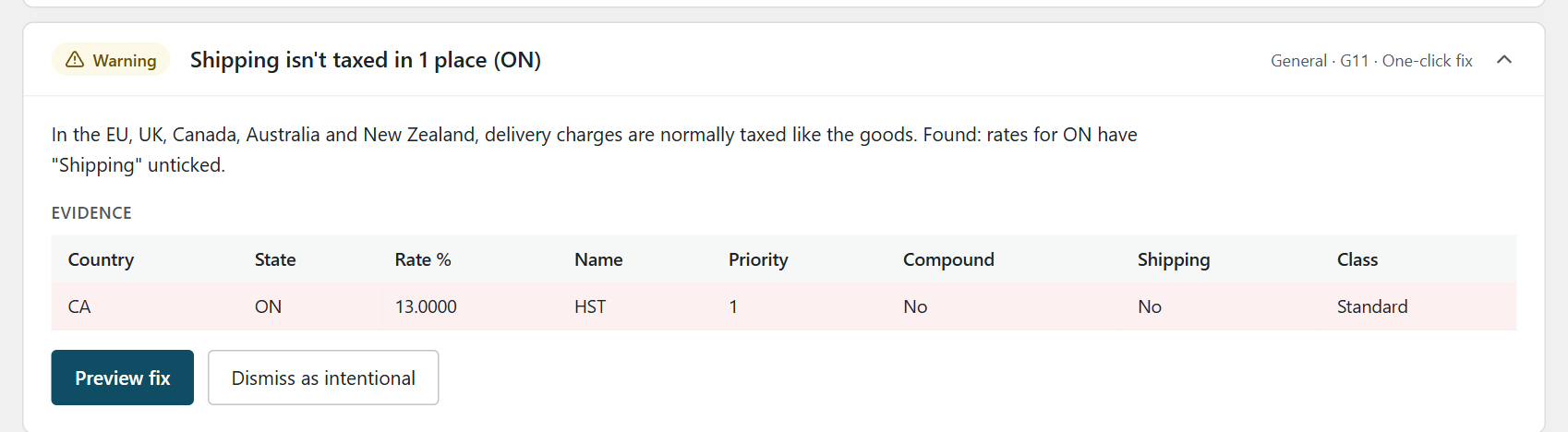
A GST/HST row with Shipping unticked, flagged as a warning by the checker described below. It doesn't check provincial rows.
In WooCommerce, three controls have to agree for shipping to be taxed: the row's Shipping box, the shipping method's Tax status (Taxable, not None) and the Shipping tax class setting from earlier. If any one says no, delivery is charged without tax.
Test five checkouts
Five test orders cover the three patterns, plus BC with and without a PST row. They confirm that the Standard-class rows match, stack and apply to shipping as intended; they don't test other tax classes, exempt products or customers, postcode rows or mixed carts. With prices entered excluding tax, rounding per line, a $100.00 product and a $10.00 flat-rate delivery charge, WooCommerce 11.1.2 on our test store charged:
| Ship to | Pattern | Tax on the $100 product | Tax on $10 shipping |
|---|---|---|---|
| Ontario | HST | HST $13.00 | $1.30 |
| Alberta | GST only | GST $5.00 | $0.50 |
| British Columbia, GST/HST only | GST, not registered for PST | GST $5.00 | $0.50 |
| British Columbia, registered for PST | GST + PST | GST $5.00 + PST $7.00 | $1.20 |
| Quebec, registered for QST | GST + QST | GST $5.00 + QST $9.98 | $1.50 |
Quebec's $9.98 is 9.975% of $100 ($9.975) rounded half up. Its shipping tax is $0.50 GST plus $1.00 QST ($0.9975 rounded), and only applies if you ticked Shipping on the QST row. Use real addresses in each province, check the tax lines, not just the total, and look at the order email as well as the checkout.
If a test shows one tax line where you expect two, check that the provincial row exists for that state code, that it's at priority 2, that the product uses the class you added it to, and that Display tax totals is set to Itemized. If it shows 15.47% for Quebec, the QST row is on Compound.
Keeping it right
Canadian rates do change: Nova Scotia's HST dropped from 15% to 14% on 1 April 2025 (CRA Notice 342), and WooCommerce's manual tax tables didn't move with it. Nothing in WooCommerce core fetches rates; the table is exactly what was last saved. Re-check it when:
- a province announces a rate change
- anyone imports a CSV, or restores a backup
- the store moves host, or a tax or VAT plugin is added or removed
- someone new starts editing settings
Checking it with TaxKeel
We built a free plugin for exactly this: TaxKeel - Tax Setup & Checker for WooCommerce, on wordpress.org. For Canada it does two jobs.
A setup wizard asks where you're based, what you sell, and whether you're registered for GST/HST. Then, separately, which provincial taxes you're registered for.
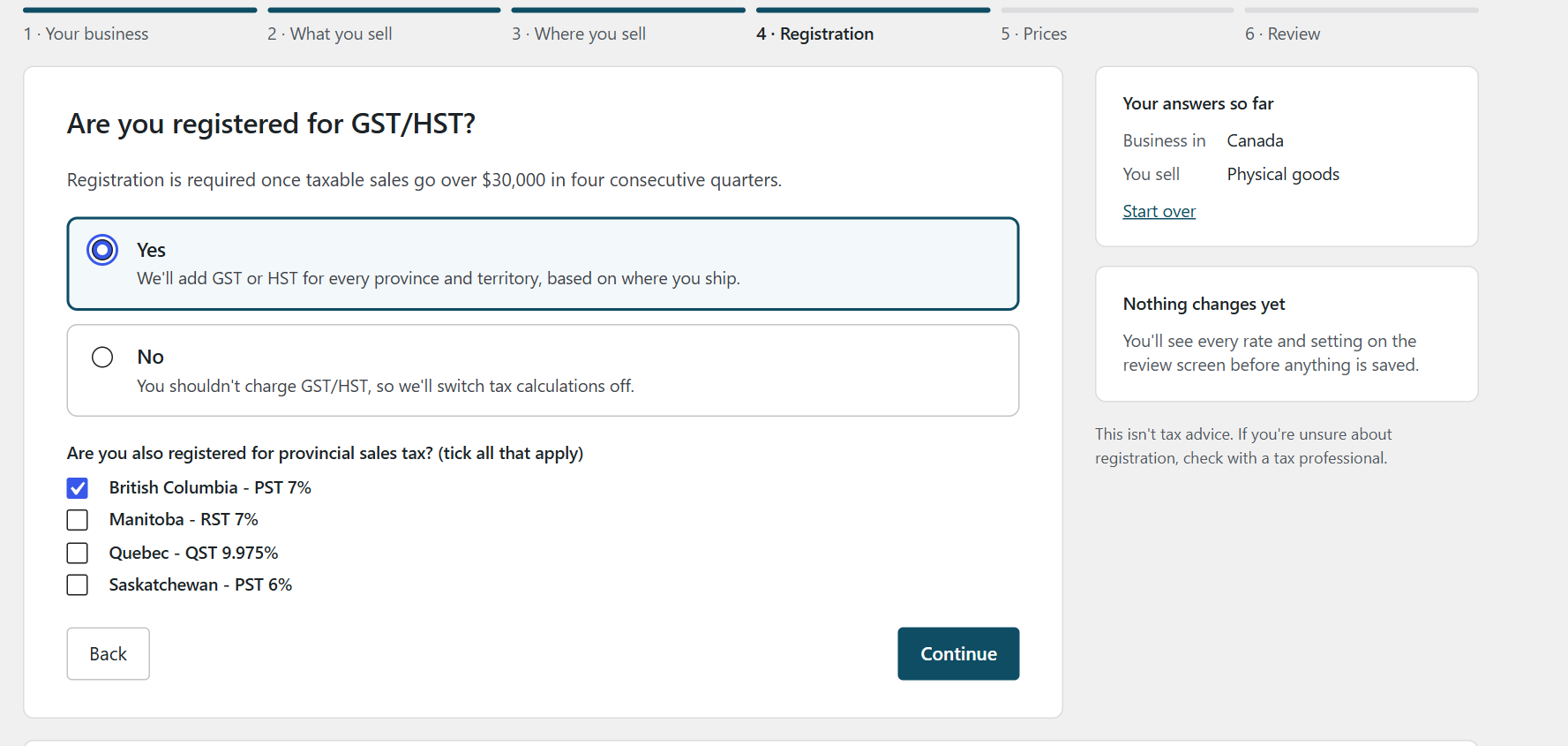
GST/HST for every province, plus PST, RST or QST only where you say you're registered.
It shows every row it will add before anything is saved, then writes the table the way this guide describes: one GST or HST row per province at priority 1, provincial rows at priority 2 for the provinces you ticked, nothing compound. It ticks Shipping on the provincial rows from its bundled data (on Saskatchewan's only when your store is outside Saskatchewan, and on Quebec's although Revenu Quebec's position isn't confirmed), so review those boxes against the shipping section before you apply.
A checker asks WooCommerce's own tax engine what a customer in each province pays on $100 and compares that with rates bundled in the plugin. In version 0.2.3, the Canadian rules are:
- C01 "Canadian province totals match published rates" - an error when a province's total doesn't match, like New Brunswick at 13%. Where the province has a single GST or HST row, the fix is one click; otherwise it sends you to the wizard.
- C02 "No Canadian rate compounds" - a compound QST or PST row.
- C03 "GST and provincial tax are separate lines" - a notice for a single combined row, such as BC at 12%; the fix splits it into two rows.
- C04 "Every Canadian province has a rate" - provinces and territories with no GST/HST rate at all.
- G11 "Shipping is taxed where it normally is" - GST/HST rows with the Shipping box unticked. It doesn't judge provincial rows, because provincial shipping rules vary.
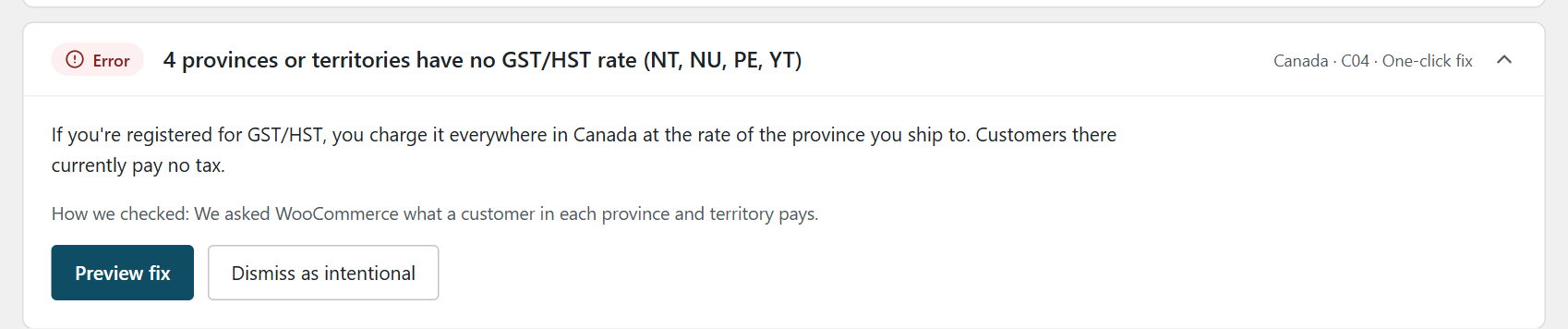
C04 on a store that only set up the provinces it thought it needed.
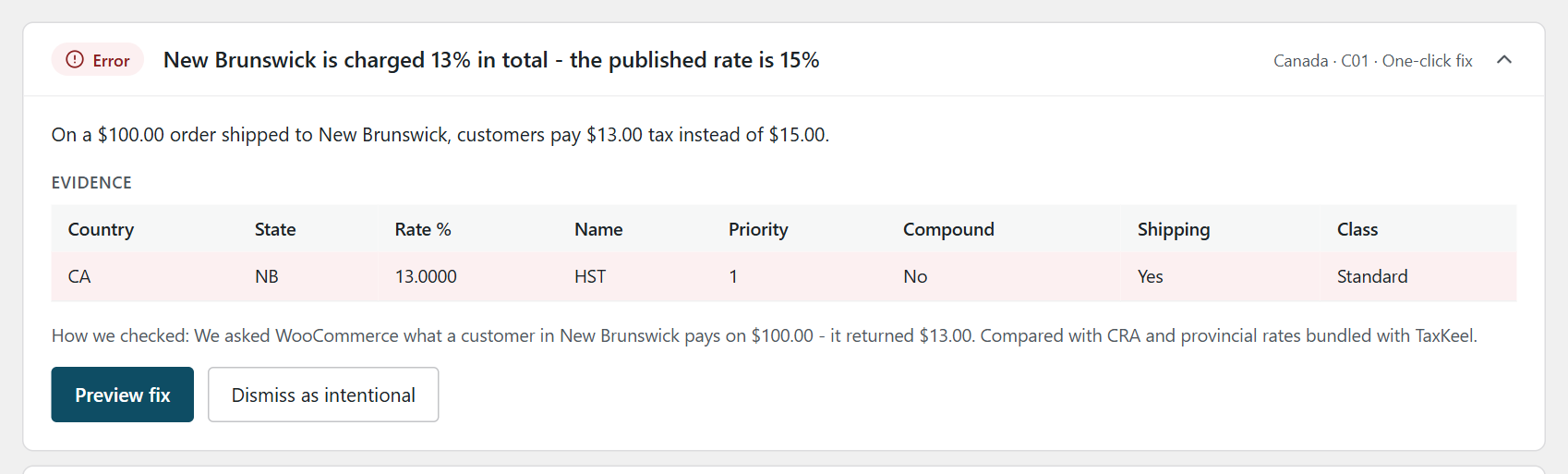
C01 compares what WooCommerce actually charges with the published rate.
Every fix is previewed first. TaxKeel saves a snapshot before changing anything and keeps the newest 20, so a fix can be undone from History; existing orders aren't touched.
Two limits worth knowing. C01 and C02 check the Standard rates class only, so other classes are yours to check by hand. And C01 uses your wizard answers: if you told it you're registered for BC PST only, a Quebec QST row shows up as Quebec charged 14.975% against a published 5%. That's deliberate - a QST row you haven't said you're registered for is worth a second look.
When you don't need it: if you sell only within one province, have a handful of rows in one tax class, and nobody else edits the settings, the manual checks above are enough. A checker earns its place across all 13 provinces, several tax classes, or a store other people change. It checks the setup; you and your accountant decide what you charge. More on the TaxKeel page.
FAQ
Do I charge HST or GST to Ontario customers?
If you're registered for GST/HST, you charge 13% HST on goods delivered to Ontario, wherever your business is based. The rate follows the province of delivery.
Do I need to collect PST in BC if I'm in Ontario?
Not automatically: BC PST is a separate registration. BC's Bulletin PST 001 requires sellers elsewhere in Canada to register in several cases, for example a seller that sells taxable goods to BC customers, accepts orders from BC and delivers them into BC, and either has more than $10,000 of BC revenue in 12 months or solicits BC customers, at any revenue. Whether you're required to is a question for the BC government or your accountant.
Should PST or QST be compound in WooCommerce?
No. Put the provincial row at priority 2 with Compound unticked, so each tax is charged on the price before tax.
Do I charge tax on shipping in Canada?
For GST/HST, a delivery charge that's part of the sale generally follows the goods, per the CRA's GI-202. Provincial taxes differ: BC PST usually applies, Saskatchewan depends on where you ship from, and for Manitoba and Quebec, check with the province or your accountant.
How many tax rows does a Canadian WooCommerce store need?
A GST/HST registrant needs 13 rows, one per province and territory, plus one more for each provincial tax it's registered for - up to 17 in the Standard class, and the same again in any other tax class it uses.
This post explains how to set up and check a WooCommerce tax table. It isn't tax advice - for decisions about what you register for, charge and report, talk to your accountant or the tax authority.
If your WooCommerce store needs more than a tax table, we also build and maintain WordPress and WooCommerce sites. Two narrower fixes from this guide have their own posts: Nova Scotia's HST cut to 14% and Quebec's GST + QST without compounding. Selling into the EU as well? Our guide to replacing Aelia EU VAT Assistant covers the VAT side.