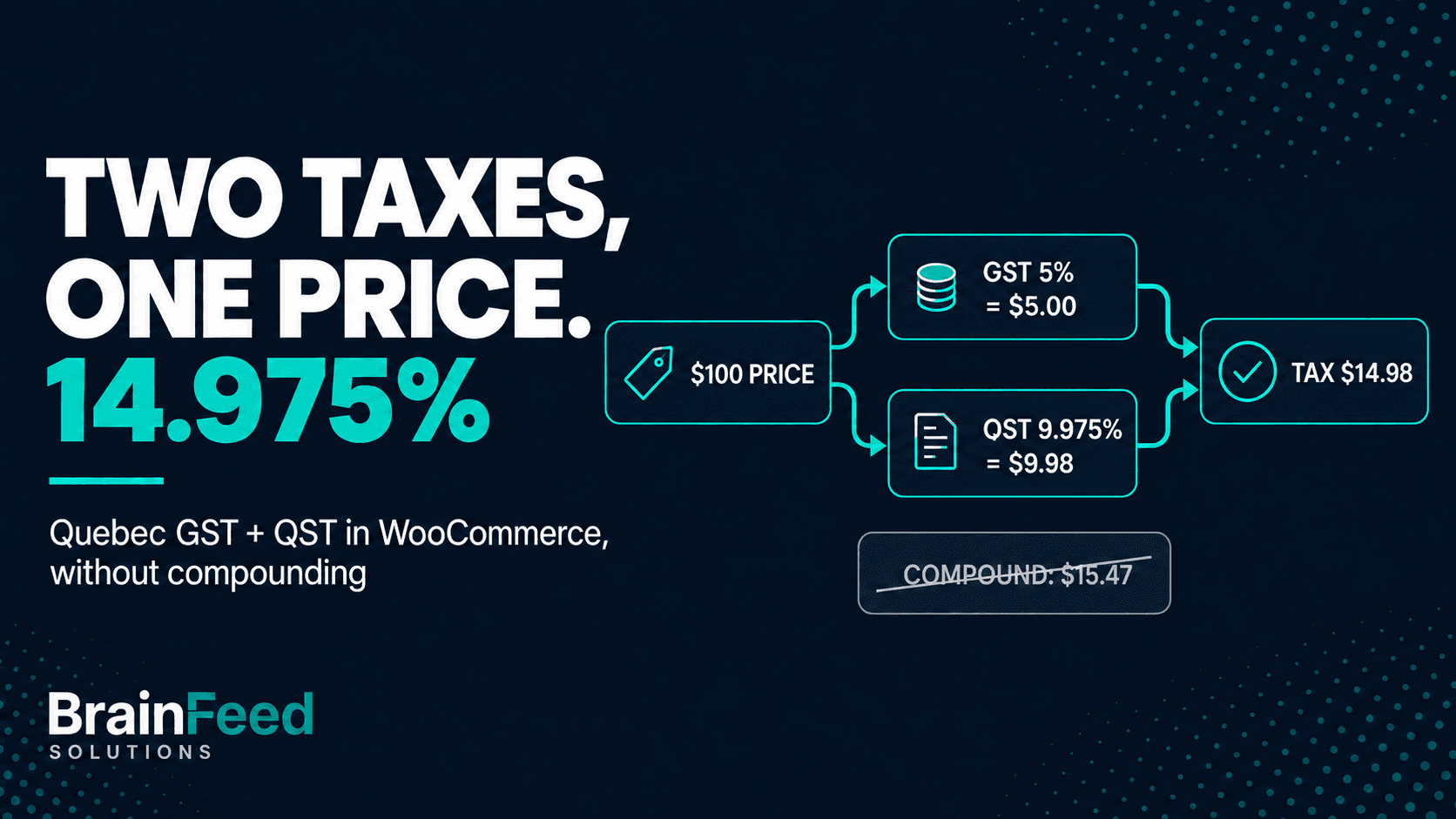
TL;DR - On a taxable sale, Quebec's combined sales tax is 14.975%: 5% GST plus 9.975% QST, each on the same price. If the QST row in your WooCommerce tax table has Compound ticked, WooCommerce charges QST on the price plus GST, and a Quebec customer pays 15.47% (15.47375% before rounding). Open WooCommerce > Settings > Tax, find the
CA/QCrows, and untick Compound on the QST row.
Compound is a normal WooCommerce option. Ticked on a QST row, it's a leftover from Quebec's pre-2013 rules that still turns up in older tutorials and rate files.
This article is for:
- WooCommerce stores that charge QST, whether they're based in Quebec or registered for QST from another province
- Developers and agencies who maintain WooCommerce stores for Canadian clients
- Store owners who set up Canadian rates once, from a CSV or a tutorial, and haven't checked them since
This article is NOT for:
- Stores that use an automated tax service (WooCommerce Tax, Avalara, TaxJar and similar) for Canadian rates - check that service's settings instead
- Anyone deciding what to do about tax already collected - that's a conversation for your accountant
Why 14.975% and not 15%
Quebec has two sales taxes: the federal GST at 5% and the provincial QST at 9.975%. Revenu Quebec's calculation rules describe the two-step method: 5% GST on the sale price, then QST at 9.975% "also" on the sale price. Neither tax is charged on the other.
It wasn't always like that. Until the end of 2012, QST was 9.5% charged on the price including GST. On 1 January 2013, GST was taken out of the QST base and the rate went up to 9.975% (Revenu Quebec's rate table; McGill's 2013 notice shows the before-and-after arithmetic). The two methods were designed to land on the same tax: 9.5% of $105 and 9.975% of $100 both come to $9.975.
That's where the 15.47% comes from: 5% + 9.975% of 105%. A QST row at 9.975% with Compound ticked mixes the two eras: the new rate with the old method.
What each setup charges on $100
What WooCommerce 11.1.2 charged for a CAD 100 cart delivered to Quebec on our test store (prices entered excluding tax, rounding per line):
| Setup | GST line | QST line | Total tax | Order total |
|---|---|---|---|---|
| GST 5% + QST 9.975%, Compound ticked | $5.00 | $10.47 | $15.47 | $115.47 |
| GST 5% + QST 9.975%, Compound unticked | $5.00 | $9.98 | $14.98 | $114.98 |
| One combined row at 14.975% | - | - | $14.98 (one line) | $114.98 |
The compound setup charges QST on $105: about half a point too much, $0.49 on this cart. The single row gets the total right but prints one tax line instead of two. QST of $9.975 rounds to $9.98 under Revenu Quebec's rule that half a cent or more rounds up.
How to check in WooCommerce
WooCommerce keeps rates per tax class, and each class (Standard, Reduced rate, Zero rate, any custom class) has its own table.
-
Go to WooCommerce > Settings > Tax and open Standard rates.
-
Find the rows with Country code
CAand State codeQC. You're looking for two rows: GST at5.0000with priority 1, and QST at9.9750with priority 2. The Compound box should be unticked on both.
The QST row has Compound ticked, so WooCommerce charges it on the price plus GST.
-
Watch for a single
QCrow at14.9750. The total is right, but it can't show GST and QST separately. -
Repeat for every other tax class listed at the top of the Tax tab.
-
Check the Postcode / ZIP and City columns. A postcode-specific
QCrow is matched before the generalQCrow at the same priority.
With many rows, the database is faster. This is read-only:
wp db query "SELECT r.tax_rate_id, r.tax_rate_class, r.tax_rate, r.tax_rate_name,
  r.tax_rate_priority, r.tax_rate_compound, GROUP_CONCAT(l.location_code) AS postcodes
FROM $(wp db prefix)woocommerce_tax_rates r
LEFT JOIN $(wp db prefix)woocommerce_tax_rate_locations l
  ON l.tax_rate_id = r.tax_rate_id AND l.location_type = 'postcode'
WHERE r.tax_rate_country = 'CA' AND r.tax_rate_state = 'QC'
GROUP BY r.tax_rate_id;"
An empty tax_rate_class is the Standard class. A 1 in tax_rate_compound on the QST row (9.9750, priority 2) is the problem.
How to fix it
A compound QST row: untick Compound on the QST row and click Save changes. Keep GST at priority 1 and QST at priority 2: two rows at the same priority means only one applies.
From WP-CLI, replace <id> with the QST row's tax_rate_id from the query and <admin> with a login that can manage WooCommerce:
wp wc tax update <id> --compound=false --user=<admin>

After the fix: same two rows, Compound unticked.
A single 14.975% row: change it to 5.0000 named GST, add a second CA / QC row at 9.9750 named QST, priority 2, Compound unticked, and set Display tax totals to Itemized. Revenu Quebec says the 14.975% rate must not appear on the document attesting to the sale, so rename labels like "GST/QST 14.975%".
Then test a CAD 100 taxable cart with a Quebec address: expect a $5.00 GST line and a $9.98 QST line, before shipping.
Three things the fix doesn't reach:
- CSV files. An old rate file still has
1in its compound column; re-importing it brings the problem back. - Subscriptions. Existing subscriptions keep the old tax until their totals are recalculated (how to update an existing subscription).
- Orders already placed. Past Quebec orders may carry the extra tax. What to do about them is a question for your accountant.
Whether QST applies to delivery charges you bill depends on the sale, so set the QST row's Shipping box after checking with Revenu Quebec or your accountant.
Or let a checker find it
We built a free plugin for this kind of setup drift: TaxKeel - Tax Setup & Checker for WooCommerce, on wordpress.org.
Its checker asks WooCommerce's tax engine what a customer in each province pays on $100 and compares that with published rates bundled in the plugin. In version 0.2.2, a compounding QST row shows up as rule C02, an error.
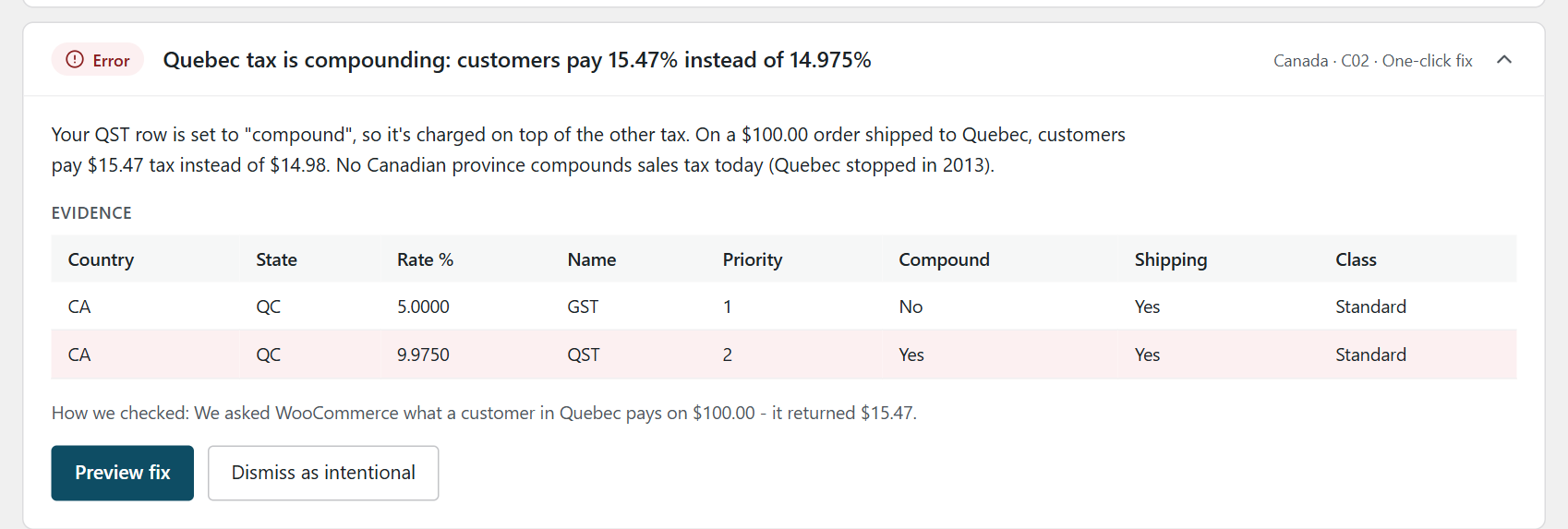
The C02 finding on a test store, with the rows behind it.
The fix turns off Compound on that row, after a preview. TaxKeel saves a snapshot first and keeps the newest 20, so the change can be undone from History; existing orders aren't touched.
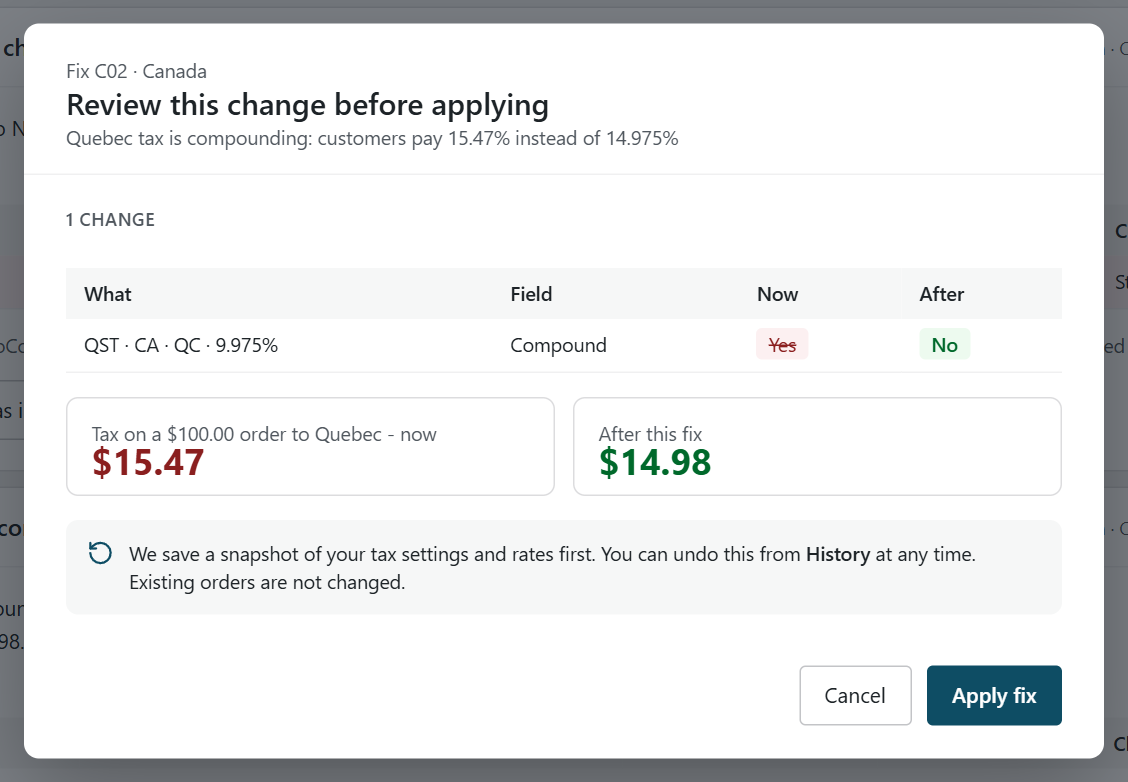
Nothing changes until you click Apply fix.
A single combined row is rule C03, a notice; its fix splits the row and sets tax totals to itemized. C02 checks the Standard class only, so other classes are yours to check by hand.
When you don't need it: if you just unticked one box in one tax class, you're done. A checker earns its place with several classes, postcode rows, or a store other people edit. It checks the setup; you and your accountant decide what you charge. More on the TaxKeel page.
Who charges QST
This article assumes you already know which taxes you collect. GST and QST are separate registrations, so a store that has confirmed it collects GST but not QST shouldn't have a QST row at all.
For sellers based elsewhere in Canada, Revenu Quebec's specified QST system sets the conditions: the supplier is outside Quebec, registered under the general GST/HST system, and makes taxable supplies in Quebec to specified Quebec consumers worth more than $30,000 in a 12-month period. Whether that describes you is a question for Revenu Quebec or your accountant.
Canadian sales tax rates at a glance
Standard headline rates in effect on 29 September 2026, from the CRA GST/HST rates page and provincial tax authorities, and the WooCommerce rows they usually mean. Exemptions and registration rules vary by product and seller.
| Province / territory | Tax | Rate | WooCommerce rows |
|---|---|---|---|
| Quebec | GST + QST | 5% + 9.975% | GST, plus QST if registered for it, Compound unticked (14.975% total) |
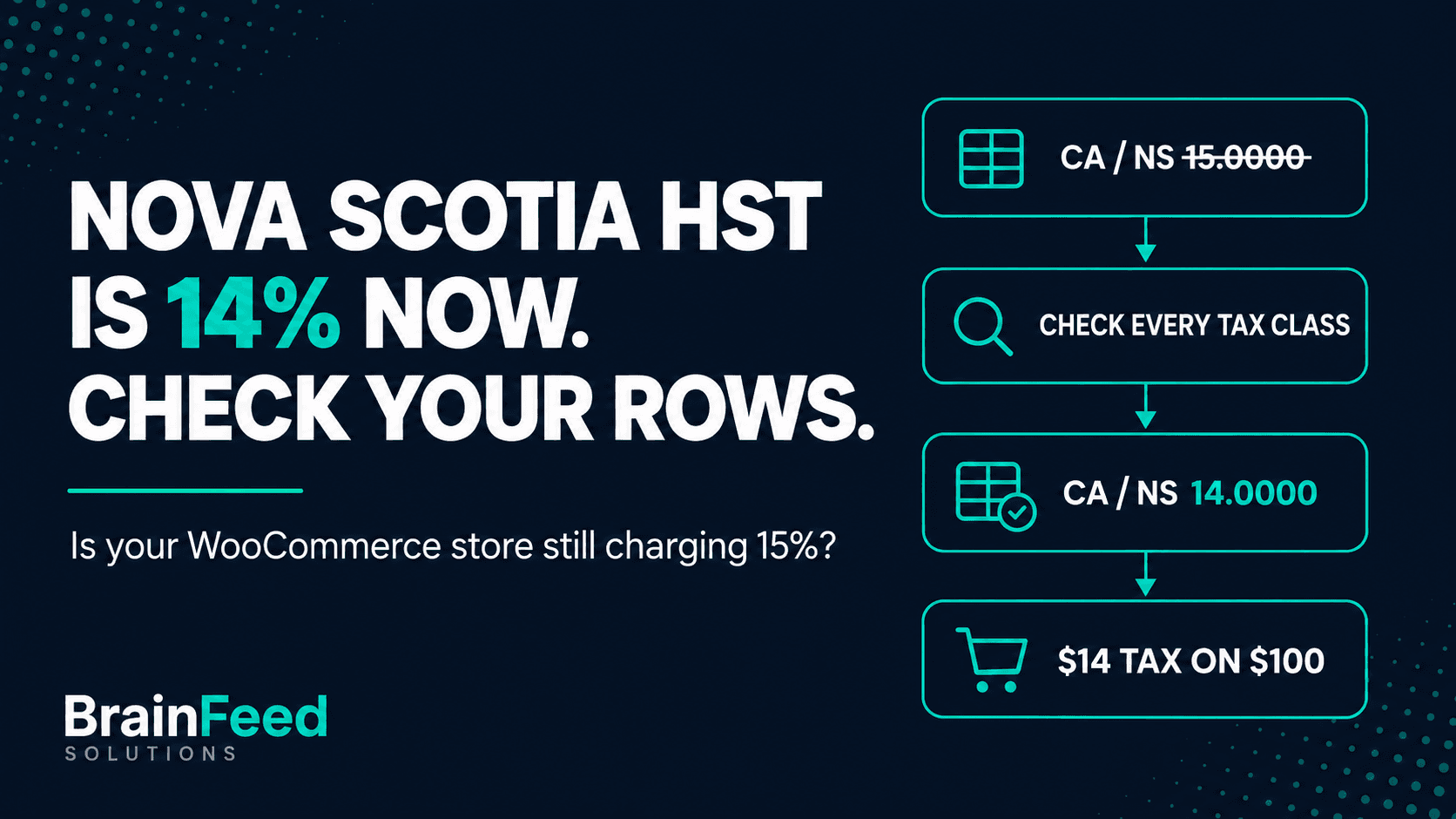
| Nova Scotia | HST | 14% | 1 row (15% until 31 March 2025) |
| New Brunswick, Newfoundland and Labrador, Prince Edward Island | HST | 15% | 1 row each |
| Ontario | HST | 13% | 1 row |
| British Columbia | GST + PST | 5% + 7% | GST, plus PST if registered for it |
| Manitoba | GST + RST | 5% + 7% | GST, plus RST if registered for it |
| Saskatchewan | GST + PST | 5% + 6% | GST, plus PST if registered for it |
| Alberta, Northwest Territories, Nunavut, Yukon | GST | 5% | 1 row each |
If you sell across Canada, the Nova Scotia HST cut is the other rate worth checking in the same table.
FAQ
Is Quebec sales tax 15% or 14.975%?
14.975%: 5% GST plus 9.975% QST, both on the price before tax.
Should QST be compound in WooCommerce?
No. Since 1 January 2013, QST is calculated on the price without GST.
Why does my checkout show 15.47% tax for Quebec?
Most likely the QST row has Compound ticked, so QST is charged on the price plus GST.
Do I show GST and QST separately?
Yes: two rows, with Display tax totals set to Itemized. Revenu Quebec says the combined 14.975% rate must not appear on the sale document.
This post explains how to check a WooCommerce setup. It isn't tax advice - for decisions about what you charge and report, talk to your accountant.
If your WooCommerce store needs more than a rate fix, we also build and maintain WordPress and WooCommerce sites. For EU sales, our guide to replacing Aelia EU VAT Assistant covers the VAT side, and Stripe vs Shopify Payments covers payments if you're weighing a platform move.