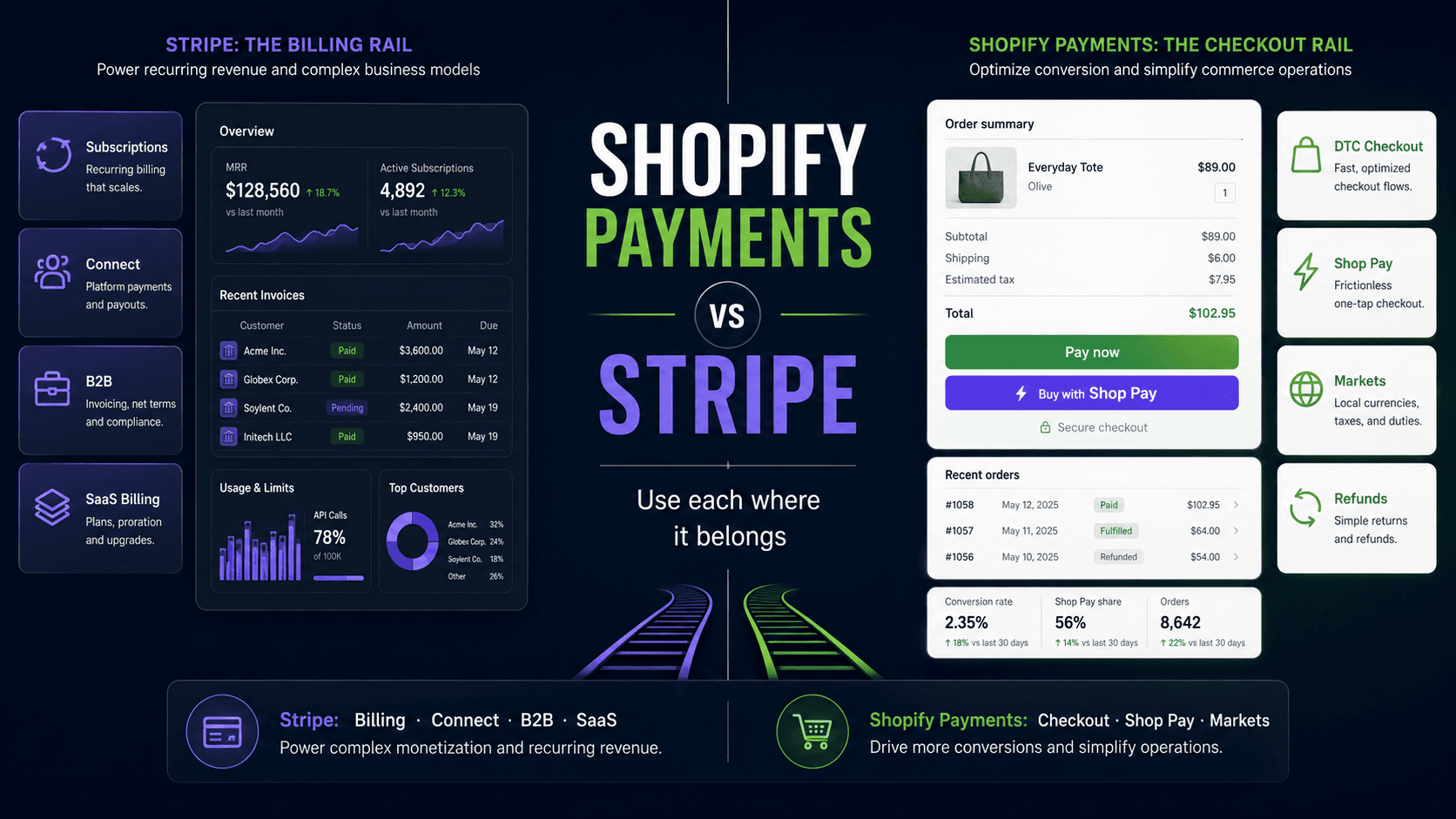
TL;DR — For a standard Shopify store, Shopify Payments is the correct choice: lower total cost, native integration, zero extra configuration. Stripe becomes the right call when you need recurring billing, marketplace payouts, B2B invoice flows, or a payment surface that lives outside Shopify's checkout. Most serious setups eventually use both — for different jobs.
Does Shopify use Stripe?
Yes, in part. In the countries where it's available, Shopify Payments is built on Stripe's payment processing infrastructure. That's why most Shopify stores never see a separate "Stripe" option: they're already using it, under Shopify's name, rates, payout schedule, and dispute tools. What you usually can't do is connect your own Stripe account as a second checkout gateway alongside Shopify Payments. So the practical question isn't "Stripe or Shopify?" It's which jobs Shopify Payments should handle and which ones need Stripe directly.
Can you integrate Stripe with Shopify?
Sometimes — but not always in the way merchants expect.
If your business is in a Shopify Payments-supported country, standalone Stripe is usually not available as a separate Shopify checkout gateway. Shopify Payments already runs on Stripe's banking infrastructure, and payment reporting stays inside Shopify. Adding a separate Stripe gateway on top is not a supported configuration in those markets.
Where Stripe becomes genuinely useful is outside the standard Shopify checkout: Stripe Billing for subscriptions, Stripe Connect for marketplace payouts, Stripe Invoicing for off-platform B2B flows, or a separate SaaS or client portal that shares the same brand but does not route through Shopify's checkout at all.
That's the architecture this article is about — not "can I turn on Stripe in the Shopify payment settings," but "where does Stripe belong in a Shopify-anchored commerce stack."
If you run a Shopify store and somebody tells you to "just use Stripe," ask them which problem they're solving. Stripe is excellent. So is Shopify Payments. They don't compete in the way the question usually implies — they own different jobs, and the common mistake is using one where the other was designed to work.
This post is the decision framework we use at BrainFeed. We've built Shopify stores that run on Shopify Payments exclusively, stores that bolt Stripe on the side for subscriptions, and marketplaces where Stripe Connect is the only architecture that makes sense. The right answer is almost always deterministic — you just need the right questions.
This article is for:
- Shopify merchants deciding which payment processor to set up
- Developers building subscription, marketplace, or B2B flows on Shopify
- Founders evaluating cost at scale before locking in a processor
This article is NOT for:
- A general comparison of Stripe vs PayPal vs Square — this is specifically about the Stripe/Shopify Payments trade-off on a Shopify storefront
- Readers who need a step-by-step Stripe integration tutorial; Shopify's own docs handle that
- Stores in markets where Shopify Payments isn't available — the decision is mostly made for you, but you still need to choose the right third-party processor
The thing most comparisons miss: the transaction fee
Every Stripe vs Shopify Payments article will show you a rate table. They'll compare 2.9% + 30¢ (Stripe) against 2.9% + 30¢ (Shopify Payments Basic). The rates look identical. The conclusion — "just pick whichever you prefer" — is wrong.
What the rate tables omit: if you use any payment provider that isn't Shopify Payments, Shopify levies an additional transaction fee on top of whatever your processor charges.
| Shopify plan | Third-party transaction fee when not using Shopify Payments |
|---|---|
| Basic | 2.0% |
| Grow | 1.0% |
| Advanced | 0.6% |
| Plus | 0.2% |
On a store doing $50,000/month on the Basic plan, that's an extra $1,000/month — every month — that disappears before you see a dollar of it. Over a year, $12,000 for the privilege of using Stripe instead of Shopify Payments on a checkout that Shopify Payments handles equally well. On the Grow plan, the math is still $500/month at that volume — $6,000/year for no functional gain.
That fee is Shopify's structural incentive for you to use its native processor, and it's the single biggest factor most merchants ignore when they set up a Stripe integration on impulse.
The transaction fee is the starting point of every payment decision for a Shopify merchant. If you're on Shopify Payments and the only reason you're considering Stripe is processing rates, the math usually doesn't work — even at Plus scale, the third-party transaction fee has to be part of the model.
When Shopify Payments is the right answer
Shopify Payments wins for the majority of direct-to-consumer Shopify stores because it's the path of least resistance and lowest total cost.
What you get with Shopify Payments:
- No additional transaction fee from Shopify
- Native refunds, disputes, and chargeback management inside the Shopify admin
- Shopify Balance and direct payouts on your Shopify plan schedule
- Built-in fraud analysis (Shopify-native risk scoring)
- Shopify Markets multi-currency — sell in local currencies, settle in yours
- Accelerated checkout via Shop Pay, which can improve checkout conversion versus standard guest checkout
- Automatic card updater (when a customer's card changes, Shopify can update recurring charges)
When Shopify Payments is the only sensible option:
- Standard DTC store, one-time purchases, no subscriptions
- Mid-market Shopify stores on Grow or Advanced, where the transaction fee gap makes Stripe expensive
- Any store where the team doesn't have the engineering time to maintain a third-party integration
- Stores where Shop Pay conversion lift is a real revenue number (it consistently is)
The tl;dr for DTC: if you're selling physical products, fulfilling orders through Shopify, and taking standard card payments, there is no compelling reason to use Stripe. You'd be paying the transaction fee to add complexity.
When Stripe is the right answer
Stripe earns its place in the architecture when you're doing things Shopify Payments wasn't designed for.
Subscriptions and recurring billing
Shopify Payments has basic subscription support through Shopify's subscription APIs, but the subscription billing product Shopify has built is thin compared to Stripe Billing's full surface: trial periods, metered billing, usage-based pricing, proration, dunning, invoice customisation, and a subscription portal you don't have to build.
If your store has a meaningful subscription component — a box subscription, a membership, a SaaS product built on the same Shopify account — and you need billing logic more complex than "charge $X every 30 days," Stripe Billing handles it. The trade-off is the transaction fee on that Shopify plan, which means most serious subscription setups keep Shopify Payments for checkout and use Stripe for the subscription billing surface separately.
Stripe Connect for marketplace payouts
This is the unambiguous case. If you're building a marketplace — multiple vendors, split payments, automated payouts to sellers — Shopify Payments has no equivalent architecture. Stripe Connect is the only production-grade tool for this job.
Stripe Connect lets you onboard merchants as connected accounts, split a payment at the point of capture between your platform and the seller, hold funds, delay payouts, run KYC and identity verification, and handle local payout methods by country. None of this is available in Shopify Payments.
If the word "marketplace" is anywhere in your product requirements, Stripe Connect is the decision, not a tradeoff.
B2B payment flows and invoicing
Shopify B2B now covers more ground than it used to: payment terms, invoices, ACH bank direct debit in supported markets, saved payment methods, payment reminders, deposits, and partial payments on eligible plans. If your B2B flow is wholesale orders handled inside Shopify's checkout, the native B2B surface is worth evaluating before reaching for Stripe.
Stripe still becomes the better fit when the B2B payment flow lives outside Shopify — a client portal, a SaaS billing surface, a custom invoice lifecycle tied to a finance system, usage-based billing, multi-entity AR, or a workflow where Shopify is only one node in a larger commerce stack. If "send invoice, collect ACH, recognise revenue in NetSuite" describes the requirement, that's a Stripe architecture, not a Shopify one.
Payments outside Shopify's checkout
If you're running a headless storefront, a custom checkout UI, a separate SaaS application, or a client portal where billing happens outside Shopify's standard checkout — and those payment events need to be captured somewhere — Stripe is designed to be embedded anywhere. Shopify Payments exists only inside Shopify's checkout flow.
This is common in hybrid architectures: a Shopify storefront for products, a separate Next.js app for the SaaS subscription tier, unified under one brand. The Shopify store runs Shopify Payments; the SaaS app runs Stripe.
Local payment methods and international coverage
Shopify Payments availability has expanded significantly in recent years and continues to grow — the current list spans North America, Europe (including EU member states, Norway, and others), the UK, APAC, Hong Kong SAR, Singapore, Mexico, and the UAE, among others. If your business is headquartered outside the supported list, Shopify Payments is unavailable and Stripe (or a local processor) is mandatory. Check Shopify's current supported-country page at the time of your processor decision — the list changes faster than any article can track it.
Even within that list, Stripe's coverage of local payment methods — Klarna, iDEAL, Bancontact, SEPA, Boleto, FPX, and others — is broader than Shopify Payments' built-in support. If you're selling into markets where card penetration is low and local methods drive conversion, Stripe's payment method library is a genuine advantage.
Advanced fraud tooling
Stripe Radar's rule engine lets you write custom fraud rules against a full feature set: IP country, card country, velocity, email domain, device fingerprint, 3DS mandate conditions. Shopify Payments' fraud tooling is simpler. For high-ticket or high-risk categories, Radar's control is worth the integration work.
The decision tree
Route by the actual job you're trying to do:
- Standard checkout, physical products, direct-to-consumer → Shopify Payments, if available
- Subscriptions with complex billing logic → Shopify Payments for checkout + Stripe Billing for the subscription surface
- Marketplace with vendor payouts → Stripe Connect — the only architecture for this
- B2B, net-terms, ACH/SEPA invoice payments → Stripe for those flows
- Shopify store + SaaS app on a separate surface → Shopify Payments on the store, Stripe on the SaaS app
- Shopify Payments unavailable in your country → Stripe (or regional processor)
- High-risk categories needing custom fraud rules → Stripe with Radar
- Pure DTC and the only question is rates → Shopify Payments — the transaction fee math wins
The "both" architecture (how serious setups look in practice)
The question isn't always "which" — it's often "where." Here's the pattern we see in production for stores at meaningful scale:
Checkout: Shopify Payments
Subscriptions: Stripe Billing, charged against a Stripe Customer object, payment surface separate from Shopify checkout
Marketplace payouts: Stripe Connect on a separate platform layer
B2B invoicing: Stripe Invoicing, sent outside checkout
The important distinction: Stripe should not be competing with Shopify Payments on the same Shopify checkout surface. In this architecture, Shopify Payments owns Shopify checkout — which avoids the third-party transaction fee on that volume entirely. Stripe owns the separate billing surfaces that Shopify checkout was not designed to handle. The two don't overlap; they're parallel rails for different jobs.
The engineering cost of running both is real. You're maintaining two integrations, two webhook handlers, two dispute workflows. That's worth it at scale; it's overkill for a store doing $20k/month on standard products.
Shopify Plus and Stripe integration
Shopify Plus doesn't change the core rule. A Plus store in a Shopify Payments country still runs checkout on Shopify Payments, and if it uses an alternative provider instead, the third-party transaction fee drops to 0.2% rather than disappearing.
What Plus changes is how much you can build around checkout. Plus stores can run custom apps with Shopify Functions, add checkout UI extensions on every step, and go headless through the Storefront API. (Which checkout surface owns which change is its own decision.) That's where Stripe fits for Plus merchants:
- Stripe Billing for subscriptions or memberships sold and managed outside the Shopify checkout
- Stripe Connect for marketplace payouts to vendors whose products are listed in Shopify
- Stripe Invoicing for B2B accounts billed off-platform on custom terms
The glue is webhooks and the Shopify Admin API: a paid Stripe invoice or subscription renewal creates or tags the matching Shopify order and customer, so fulfilment, inventory, and reporting stay in Shopify while billing lives in Stripe. The integration work is modest. The design work is getting clear on which system owns the customer, the order, and the refund.
What bites you in production
These are the mistakes we've seen teams make once the integration is live.
Forgetting the transaction fee during initial setup. The Stripe dashboard is clean and familiar, the docs are excellent, and it takes 20 minutes to integrate. Merchants enable it, connect it, and six months later wonder why their margins eroded. The transaction fee doesn't surface prominently in setup — you have to go looking for it. Go looking.
Using Stripe for standard checkout on a mid-tier plan. On the Grow plan (1% transaction fee), a store doing $100k/month is paying $1,000/month in extra fees — $12,000/year — to not use Shopify Payments. There is almost no processing rate advantage that overcomes this.
Assuming Shopify's subscription APIs equal Stripe Billing. Shopify has subscription APIs that work with apps like Recharge. They're fine for a $30/month box subscription. They're not Stripe Billing: no metered usage, limited proration, no customer self-serve portal out of the box. If you're building SaaS pricing tiers, usage-based billing, or complex dunning sequences, Shopify's subscription surface will run out before your requirements do.
Building marketplace payouts on Shopify Payments. This simply doesn't work. Shopify Payments is one seller. You cannot split a payment to multiple connected accounts, route a percentage to a vendor, or automate seller payouts. We've seen teams try to approximate this with manual bank transfers. The operational cost is crushing. Stripe Connect is the product that exists for this, and there isn't a workaround.
Triggering Shopify's high-risk review with Stripe. Shopify monitors for unusual patterns on stores. Adding a third-party processor without understanding Shopify's terms for your product category occasionally triggers account reviews. Know Shopify's prohibited and restricted items list before integrating any alternative processor.
When you shouldn't add either integration
Don't add Stripe because the documentation is better. Shopify Payments' documentation is less exciting. It is also less complicated because it requires almost no integration work — it's on by default. The better documentation isn't a signal that Stripe is technically superior for your checkout; it's a signal that Stripe has a more complex surface area.
Don't add a payment processor before you understand your billing requirements. Most early stores don't have subscriptions, marketplace payouts, or B2B invoice flows. Most early stores have: customers, products, and a checkout. Shopify Payments is designed for that. Stripe's value is in billing features you don't need yet.
Don't run both processors on the same checkout surface to compare rates. A/B testing payment providers is operationally painful: split webhook handlers, fragmented reconciliation, support headaches when customers ask why they got charged by a different entity. Run both processors when they serve different jobs. Don't run them in parallel for the same job.
The real question behind the question
Most "Stripe vs Shopify Payments" searches are actually asking: am I leaving money on the table? The answer, for the overwhelming majority of Shopify merchants, is that adding Stripe to a standard checkout is how you put money on the table rather than collect it.
The calculus changes exactly when your billing requirements change. Subscriptions, marketplace payouts, off-platform payment surfaces, B2B net terms — those are the moments where Stripe's billing infrastructure earns the integration cost. Everything before that is complexity in search of a problem.
The merchants who get this right build on Shopify Payments from day one, run it until their billing requirements outgrow it, and then add Stripe at the exact surface where Shopify Payments stops. That's not a compromise. That's the architecture.
FAQ
Does Shopify use Stripe?
Shopify Payments is built on Stripe's processing infrastructure in the countries where it's available. Merchants see it as Shopify Payments, with Shopify's rates, payouts, and dispute tools, rather than as their own Stripe account.
Is Stripe better than Shopify?
They aren't the same kind of product. Shopify is an ecommerce platform: storefront, catalog, checkout, and orders. Stripe is payments infrastructure for billing, invoicing, and payouts. The real comparison is Stripe vs Shopify Payments, and for a standard Shopify checkout, Shopify Payments usually wins on total cost.
Can Shopify Plus stores integrate Stripe?
Yes, for work outside the standard checkout: subscriptions on Stripe Billing, marketplace payouts on Stripe Connect, and B2B invoicing on Stripe Invoicing, synced with Shopify through webhooks and the Admin API. Checkout itself usually stays on Shopify Payments.
Can I use Stripe with Shopify?
In most Shopify Payments-supported countries, standalone Stripe is not available as a separate Shopify checkout gateway. Stripe is still the right tool for off-checkout billing: subscriptions, marketplace payouts, SaaS billing, B2B invoicing, and custom payment surfaces outside Shopify's standard checkout.
Does Shopify charge extra fees if I use Stripe?
If Stripe is used as a third-party Shopify payment provider on the checkout, Shopify's third-party transaction fee applies on top of Stripe's processing fee. The fee depends on your Shopify plan (Basic: 2%, Grow: 1%, Advanced: 0.6%, Plus: 0.2%). Confirm current rates on Shopify's pricing page before making a plan decision.
Should I use Stripe or Shopify Payments for a standard Shopify store?
Use Shopify Payments. It's native, avoids the third-party transaction fee, integrates directly with Shopify admin, and supports Shop Pay. There's no meaningful advantage to using Stripe for a standard DTC checkout.
When should a Shopify store use Stripe?
When the payment flow lives outside Shopify's checkout: complex subscriptions, SaaS billing, marketplace payouts, B2B invoices, usage-based billing, or a custom payment portal. Also when Shopify Payments is unavailable in your business's country and a third-party processor is required.
If you're trying to work out where your Shopify store sits in that progression, or you're building a subscription or marketplace layer and want to get the payment architecture right from the start, that's the work we do. For stores with a SaaS component running alongside Shopify, the same conversation applies to the billing surface.
Next in this series: building SaaS billing on Stripe from scratch — pricing models, webhooks, the dunning sequence nobody builds until customers churn over failed payments.