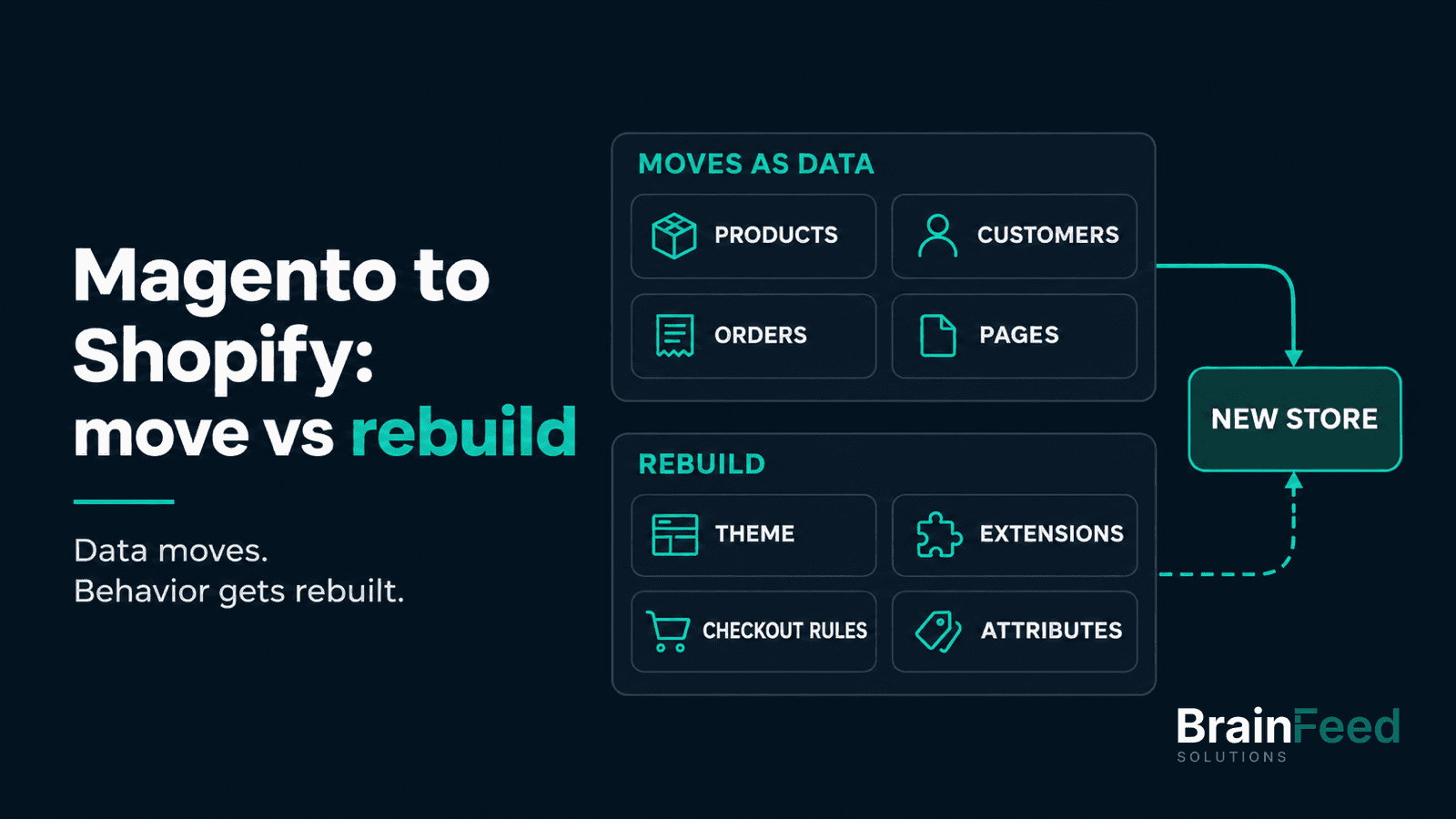
TL;DR: What do you move and what do you rebuild in a Magento to Shopify migration? Data moves: products and customers can use CSV, while historical orders and gift cards go through a migration app or Shopify's APIs, and blogs and pages move too. Behavior gets rebuilt: theme, extensions, custom checkout rules and anything that lived in Magento code. Customer passwords can't be migrated by CSV, and URL redirects need a plan before launch. Facts below were checked against Shopify and Adobe documentation on 20 Nov 2026.
This article is for owners, ops leads and CTOs who already run on Magento and are weighing a move. This article is NOT for first-time store builders, or anyone looking for a pitch that Shopify fits every Magento store. The last section covers when to stay.
If you run Adobe Commerce or Magento Open Source today, the question is rarely "can Shopify sell what we sell." It is "which parts of our store are data, which are behavior, and how much of the behavior do we still need." Getting that split right decides the budget, the timeline and how much search traffic survives launch day.
Why teams look at leaving Magento now
Adobe publishes a support calendar for each Adobe Commerce release line, and it is the clearest forcing function for a decision. As of 20 Nov 2026, Adobe's released versions page shows:
- 2.4.10 released 13 Oct 2026, with no support end date set yet.
- 2.4.9 and 2.4.8: regular support ends 31 May 2029 and 31 May 2028.
- 2.4.7: regular support ends 31 May 2027, extended support 31 May 2028.
- 2.4.6: regular support ended 11 Aug 2026; extended support runs to 31 Aug 2027.
- 2.4.5: regular support ended 12 Aug 2025 and extended support ended 11 Aug 2026.
- 2.4.4: regular support ended 12 Apr 2025 and extended support ended 14 Apr 2026.
- For both 2.4.5 and 2.4.4, additional security fixes run only until 31 May 2027.
These dates are for Adobe Commerce. Magento Open Source follows its own lifecycle, which this article does not cover.
If you are on 2.4.4 or 2.4.5, you are past regular and extended support, so staying means an upgrade project anyway. If you are on 2.4.6, regular support has ended but extended support runs to 31 Aug 2027, so the upgrade decision is due before then. Either way, a migration is a fair comparison against that upgrade, not against doing nothing.
This is a support-calendar fact, not a verdict. A supported version is a good reason to compare options, not a reason to move.
What moves as data
Shopify's own migration guide gives examples of what you can migrate: products, customers, historical (fulfilled) orders, gift cards, certificates and store credits, blogs and pages. They do not all travel the same way. Per the guide, products and customers can use CSV, while historical orders and gift cards, certificates and store credits go through a migration app or Shopify's Order, Transaction and gift card APIs. Shopify describes five transfer methods, from least to most technical: copy and paste, CSV export and import, a migration app, a Shopify Partner, or a custom API migration.
Three rules from the documentation decide the order of work:
- Import products first, then customers, then historical orders. Orders reference both.
- Back up before every CSV import. Shopify states product CSV imports can't be canceled and keep no history.
- Test large product imports on a development store. Sorting a product CSV in Excel or Numbers can break image links, and the option to overwrite products with matching handles can blank non-required columns that are empty in your file.
Customer passwords are the catch. Shopify states you can't migrate customer passwords using a CSV because they are encrypted outside Shopify. Plan for an invitation email so customers set a new password, and brief support before launch.
What you rebuild
Treat this as an audit sort: what is plain data and imports, and what is behavior you rebuild. Code, configuration and extensions in Magento are behavior, and in general there is no import path for them. Attributes sit on the line, because the values import while the structure behind them is rebuilt as definitions. Sort what you find into four buckets:
| Magento thing | On Shopify | Decision |
|---|---|---|
| Theme and storefront templates | New theme build | Rebuild, then test every template |
| Extensions and modules | An app, a built-in feature, or custom work | Audit each one; many are not worth keeping |
| Custom attributes and product data | Metafields and metaobjects | Design the definitions before importing |
| Custom checkout rules, discounts, shipping logic | Shopify Functions and checkout extensions | Rebuild per rule |
Two facts from Shopify's developer docs shape this work.
Custom data. Metafields add a field to an existing resource such as a product. Metaobjects define new record types, for example a size chart or store location. Definitions come first, so map your Magento attributes into definitions before you import products. Check the current metafield and metaobject limits before designing around large data sets.
Checkout and logic. Shopify's supported route is checkout UI extensions and Functions, which are upgrade-safe. Per Shopify's docs, stores on any plan can use public apps that contain Functions, while only Plus stores can use custom apps containing Function APIs, and some capabilities are Plus-only. If your Magento checkout carries custom business rules, confirm which Shopify plan the rebuild needs before you commit to the project scope.
Also check catalog limits. By default Shopify limits a product to 2,048 variants (Admin GraphQL Product object, API version 2026-10). A Magento catalog with heavy configurable products can exceed that, and those products need a different model, such as splitting them.
Redirects decide whether search traffic survives
Every Magento URL that ranks needs a destination on Shopify. Shopify's redirect rules have limits you should know before you plan:
- Only broken URLs (404s) can be redirected.
- You can't redirect URLs that start with /apps, /application, /cart, /carts, /orders, /services or /shop, or the fixed paths /products, /collections and /collections/all.
- Collection tag-filter URLs can't be redirected, and query-string URLs may not behave as expected.
- A .html URL can't redirect to the same URL without .html.
- The limit is 100,000 redirects, or 20,000,000 on Plus.
Browsers and search engines cache 301 redirects, so a wrong mapping is slow to undo. If you sell in several markets, test redirects on each market path, because Shopify's redirect documentation is not consistent about market subfolders. Redirects can be bulk-imported by CSV. Set them up before the domain transfer, test them on the live domain, then submit your sitemap and review SEO titles and descriptions for your most-visited pages.
Order of work
- Inventory: export products, customers, orders and every URL that gets traffic. List each extension and the job it does.
- Decide per extension: Shopify feature, app, custom build or drop.
- Design metafield and metaobject definitions from your Magento attributes.
- Build the theme and the logic rebuilds on a development store.
- Run a test import, check images, variants and order history, and fix the mapping.
- Load redirects, set up payments, shipping, taxes and test orders.
- Run the real import, in Shopify's order: products, then customers, then historical orders.
- Settle the cutover before you move the domain: will you freeze changes on the old store, or sync the orders, customers and inventory that changed after the test import? And what is your rollback point if launch goes wrong?
- Move the domain, then confirm the redirects work on the live domain.
When not to migrate
Stay on Magento if the store depends on deep custom back-office logic that has no sensible Shopify equivalent, if variant counts or data models truly don't fit, or if you are mid-way through a healthy upgrade on a supported version and nothing is hurting. A migration that rebuilds half the store to preserve behavior nobody uses is a bad trade. Audit first, then decide.
What to do next
- Write down your Magento version and its support end date from Adobe's released versions page.
- Export your top landing pages and all product and category URLs.
- List every extension and mark it keep, replace or drop.
- Check your largest configurable products against the 2,048 variant default.
- If you want a second opinion on scope, see Shopify migration services or write to hello@brainfeedsolutions.com.
FAQs
Can I migrate Magento customer passwords to Shopify? Not with a CSV. Shopify states customer passwords can't be migrated using a CSV because they are encrypted outside Shopify. Import customers, then invite them to create new passwords.
What data can I move from Magento to Shopify? Shopify's migration guide gives examples including products, customers, historical fulfilled orders, gift cards and store credits, blogs and pages. Products and customers can use CSV; historical orders and gift cards go through a migration app or Shopify's APIs. Themes, extensions and custom code have no import path and are rebuilt.
In what order should I import data? Products first, then customers, then historical orders, per Shopify's guidance. Back up before every CSV import because product CSV imports can't be canceled.
Will my SEO rankings survive the move? Not by default. Map every ranking URL to a Shopify destination and load the redirects before the domain transfer. Shopify can only redirect URLs that are broken, and some paths such as /products and /collections can't be redirected.
How many variants can a Shopify product have? By default 2,048 per product, per Shopify's Admin GraphQL Product documentation for API version 2026-10. Check large configurable Magento products against that limit.
Where do Magento custom attributes go on Shopify? Into metafields, which add a field to an existing resource, or metaobjects, which define new record types. Create the definitions before you import.
Is Magento 2.4.6 still supported? As of 20 Nov 2026 Adobe lists regular support for 2.4.6 as ended on 11 Aug 2026, with extended support to 31 Aug 2027. Check Adobe's released versions page for the current dates.
Do I need Shopify Plus to rebuild custom checkout logic? Not always. Stores on any plan can use public apps containing Functions, but only Plus stores can use custom apps containing Function APIs, and some capabilities are Plus-only.