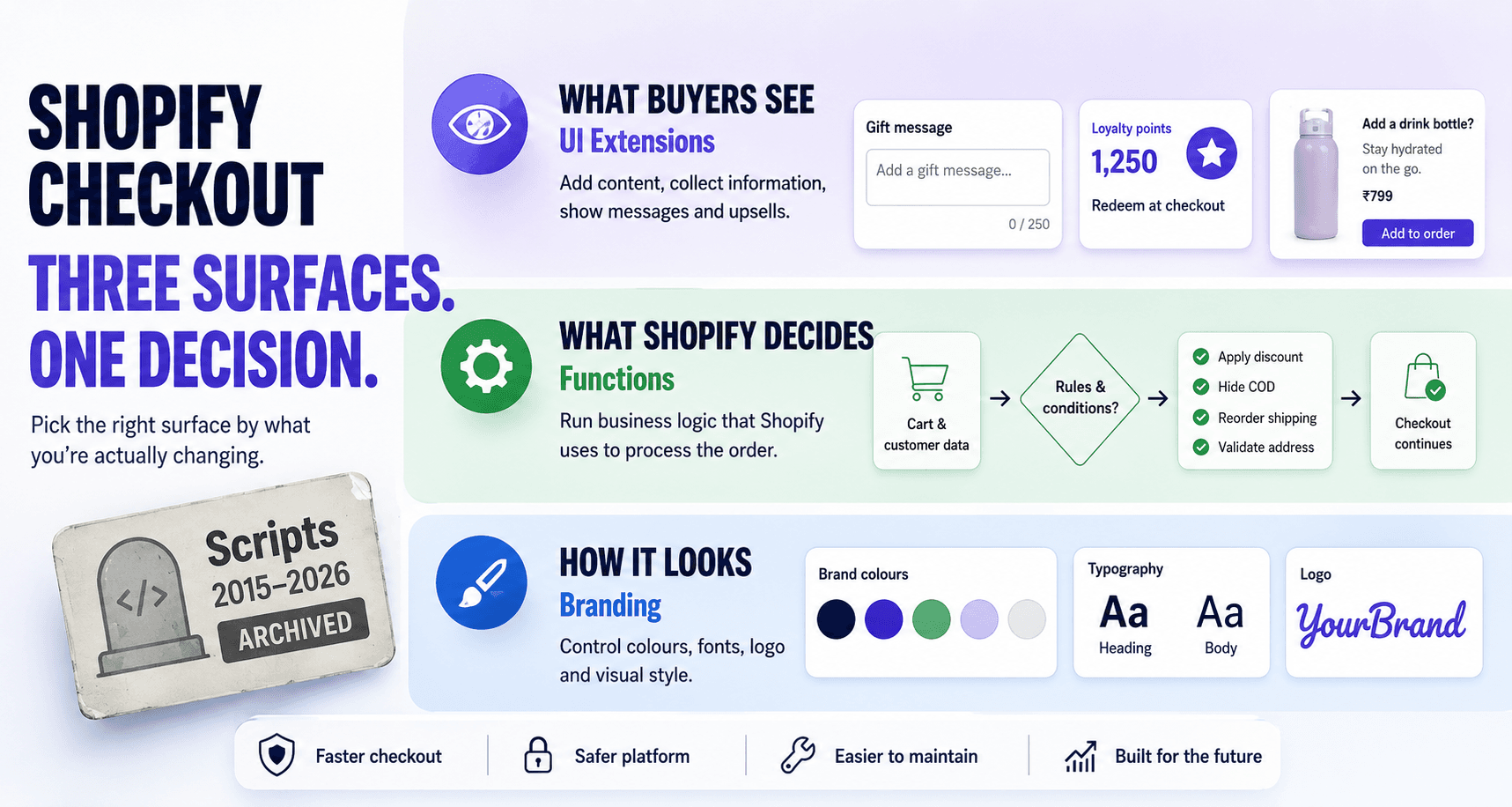
TL;DR — Shopify split checkout into three layers. What buyers see → UI Extensions. What Shopify decides → Functions. How it looks → Branding. Scripts, the thing that used to do all three at once, stopped running on 30 June 2026. Pick your surface by what you're actually changing, not by what you used to write a Script for.
If you customise Shopify checkouts, the question you ask in 2026 is no longer "how do I write this?" It's "where does this belong?" That's a better question, and the platform now forces you to answer it before you write a line of code.
For a decade, the answer was Scripts. One Ruby box on a Plus store, and you could change a price, hide a payment method, and inject a banner from the same place. That era is over. Scripts became read-only on 15 April 2026 and stopped executing on 30 June 2026. Any Script still published on that date was deactivated. If your discounts, shipping rules, or payment rules quietly stopped working in July, this is why.
What replaced Scripts isn't one thing. It's a deliberate split into three surfaces, each with one job. This post is the decision framework we use at BrainFeed to route any checkout request to the right one — built as a tree, a lookup table, and a migration map, because the same idea lands differently depending on whether you're a merchant, an engineer, or an architect.
This article is for:
- Developers and technical PMs who have a specific checkout change to make and aren't sure which surface owns it
- Teams whose Scripts were switched off on 30 June and who need to know where each piece of logic lives now
- Anyone who just searched "how do I hide a payment method in Shopify checkout"
This article is NOT for:
- Plus stores needing a full Checkout Extensibility migration runbook — that's a separate post in our Migration & Scaling pillar
- Anyone wanting an exhaustive API reference; Shopify's docs do that better than any blog can
- Readers hoping for a "Shopify is locking everything down" hot take — the split is an upgrade, and I'll argue why
Why Scripts disappeared
Scripts was a single Ruby file that ran inside checkout on Plus stores. It could rewrite line-item prices, reorder or hide shipping and payment methods, and drop markup onto the Thank You and Order Status pages. One surface, total reach — the appeal and the problem in one.
That reach is what made checkout impossible for Shopify to improve. If any Script could run arbitrary code against the page, Shopify couldn't upgrade or harden checkout without risking every customisation built on top of it — performance and security held hostage by a feature designed to do anything, anywhere.
So Shopify drew boundaries. The timeline, precisely:
- 28 August 2025 —
checkout.liquidfor the Information, Shipping, and Payment steps was sunset. Stores that hadn't moved are being auto-upgraded. - 15 April 2026 — Scripts became read-only. No new Scripts, no edits to existing ones.
- 30 June 2026 — Scripts stopped running. Any pricing, shipping, payment, or bundle logic still living in a Script broke on 1 July.
- 30 July 2026 — the read-only Script Editor closed. The Scripts customizations report in the Shopify admin still lists what was active, with suggested Functions or apps for each.
- 26 August 2026 — non-Plus stores lost the Additional Scripts, Thank You, and Order Status script boxes too.
The lesson worth carrying out of the Scripts era isn't "Shopify took my toy away." It's that Scripts let you put logic and presentation in the same box, and that convenience became a category error. The new model makes you separate the two — and the rest of this article is why that separation is the point.
The three modern layers
Checkout UI Extensions are how you change what the buyer sees. They're Preact (or plain JS) components, built from Shopify's Polaris web components, that render at fixed extension points in the checkout, customer account, and post-purchase flows. They run in a sandboxed Web Worker with no access to the DOM, the window, or sensitive payment data — they render through Shopify's component APIs, not into the page directly. This is the layer for fields, messages, banners, upsells, and anything informational or lightly interactive.
Shopify Functions are how you change what Shopify decides. They're small programs compiled to WebAssembly (Rust, or JavaScript via Javy) that run on Shopify's servers as part of checkout's own logic: computing discounts, hiding or reordering delivery and payment methods, validating the cart, and transforming line items for bundles. They take a GraphQL input query and return a set of operations. They are pure logic — no UI, and crucially no network access.
Branding is how you change how it looks. Colours, fonts, logo, corner radius, button styles — configured through the checkout editor and the Branding API, not written as code. If the request is "make it match our brand," this is the layer, and reaching for an extension to do it is a mistake.
The capability matrix
If you remember one image from this article, make it this. Five seconds tells you where anything belongs:
| Capability | UI Extensions | Functions | Branding |
|---|---|---|---|
| Show / add content to checkout | ✓ | ✗ | ✗ |
| Run business logic | ✗ | ✓ | ✗ |
| Modify shipping / delivery options | ✗ | ✓ | ✗ |
| Modify payment options | ✗ | ✓ | ✗ |
| Apply / compute discounts | ✗ | ✓ | ✗ |
| Block / validate checkout | ✗ | ✓ | ✗ |
| Make network calls | ✓ (opt-in) | ✗ | ✗ |
| Change colours / fonts / logo | Limited | ✗ | ✓ |
The matrix is also the argument. Almost every row has exactly one ✓. The surfaces barely overlap — and where they do (network calls in UI Extensions, limited styling), it's deliberate, not redundant.
The decision tree
Route by the job you're trying to do:
- Changing what the buyer sees — a field, a message, a banner, an upsell → UI Extension
- Changing a discount — tiered, bundle, conditional → Discount Function
- Changing shipping/delivery — hide, rename, reorder methods; pincode rules → Delivery Customization Function
- Changing payment — hide, rename, reorder methods; threshold rules → Payment Customization Function
- Blocking or validating the cart — min order, address rules, B2B gates → Cart & Checkout Validation Function
- Bundling — merge or expand line items → Cart Transform Function
- Look-and-feel only — colours, fonts, logo → Branding (no code)
- Logic and matching UI — e.g. a custom discount and a line explaining it → Function + UI Extension together
The last branch is the one people miss. Logic and its explanation are now two surfaces by design: the Function decides, the UI Extension narrates. That feels like extra work until the first time you change the logic without touching the copy, or vice versa.
Ask the right question first
The whole framework turns on the question you ask before you build:
Wrong question: "How do I hide Cash on Delivery?" Right question: "Am I changing payment logic or checkout UI?"
Hiding COD is a payment-logic change → Payment Function. Name the surface first and the implementation follows. Ask the wrong question and you'll lose an afternoon trying to hide a payment method from a UI Extension that was never allowed to touch one.
Migrating Shopify Scripts to Shopify Functions
If you're rebuilding what your Scripts used to do, this is the map. Start from the Scripts customizations report in your Shopify admin, which lists every customization that was live before 30 June, then route each one here. Every Script use case has exactly one new home:
| Old Script use case | New home |
|---|---|
| Line-item / order discounts | Discount Function |
| Tiered or conditional shipping rates | Delivery Customization Function |
| Hiding or reordering payment methods | Payment Customization Function |
| Bundle / "buy X get Y" logic | Discount Function + Cart Transform |
| Cart validation / purchase rules | Cart & Checkout Validation Function |
| Checkout messaging / banners | UI Extension |
checkout.liquid styling | Branding |
Common requests, mapped
This is the lookup the rest of the article exists to support. Nobody searches for "checkout surfaces" — they search for the thing they need to ship today. Find the row, ship the right layer.
| Requirement | Surface |
|---|---|
| Add a delivery-note or gift-message field | UI Extension |
| Show loyalty points / store-credit balance | UI Extension |
| Show a custom upsell or cross-sell block | UI Extension |
| Display a shipping-ETA or trust message | UI Extension |
| Explain why a discount applied | UI Extension (+ Function) |
| Hide Cash on Delivery above ₹10,000 | Payment Function |
| Reorder or rename payment methods | Payment Function |
| Hide express shipping for certain pincodes | Delivery Function |
| Rename a shipping option | Delivery Function |
| Tiered / volume discounts | Discount Function |
| Buy-X-get-Y or bundle pricing | Discount Function + Cart Transform |
| Block PO box / restricted addresses | Validation Function |
| Enforce a minimum order value | Validation Function |
| Validate GST / VAT number format | Validation Function |
| Restrict checkout by customer tag (B2B) | Validation Function (+ UI Extension) |
| Merge or expand bundle line items | Cart Transform Function |
| Change checkout colours, fonts, or logo | Branding |
| Adjust button style or corner radius | Branding |
Bookmark-worthy, and worth saying once: if a row pulls you toward two surfaces, that's not the framework failing — it's the seen-versus-decided split showing through.
The scorecard
The tree tells you which. This tells you why, and where each surface stops:
| Surface | Runs where | Best for | Hard limits | Wrong tool when |
|---|---|---|---|---|
| UI Extensions | Buyer's browser, sandboxed Web Worker | What the buyer sees; light interaction | No DOM/window; checkout-step extensions are Plus-only; can't touch pricing/shipping/payment logic | You need to change a rule or a price |
| Functions | Shopify's servers, WebAssembly | Discounts, delivery/payment rules, validation, bundles | No network/IO; deterministic; per-store count limits; custom-app Functions are Plus-only; renders nothing | You need to show or explain something |
| Branding | Checkout editor / Branding API | Colours, fonts, logo, radius | Style only, within Shopify's tokens; no logic, no new content | You need behaviour, not appearance |
| Scripts (RIP) | Legacy Plus checkout | — historical — | Read-only from 15 Apr 2026; switched off 30 Jun 2026 | Always. They no longer run, so rebuild on Functions |
What bites you in production
These constraints trip up teams arriving from the Scripts world. Read them not as complaints but as the shape of the bargain: each limit is the price of a checkout Shopify can keep making faster and safer underneath you.
Functions can't reach the network — on purpose. No fetch, no database, no external pricing service mid-checkout. A Function takes its GraphQL input and returns operations; that's the whole contract. It feels restrictive until you realise it's why a Function can run inside checkout's hot path without becoming a latency or reliability risk. If a decision genuinely needs external data, you precompute it (metafields, tags, cart attributes set earlier) and let the Function read that. Determinism isn't a tax here — it's what makes the checkout fast.
UI Extensions can't see the page — also on purpose. Sandboxed in a Web Worker, no DOM, no window, no access to payment fields. You don't style the checkout from an extension and you can't scrape it; you compose through Shopify's component and API surface. That isolation is exactly what lets Shopify restyle and re-lay-out checkout without breaking your extension. UI Extensions can make network calls, but only opt-in: you set network_access = true in the extension's capabilities, and the call goes to your app backend, not arbitrary origins.
Functions have count limits, and an execution order. As of mid-2026 a store runs at most 5 Discount Functions, 1 Cart Transform, and 5 Validation Functions, and they execute in a fixed order — transforms and pricing first, then discounts, then validation. Architect for that order; two Functions fighting over the same outcome is a self-inflicted wound, not a platform bug.
The Plus line moved, and it's the most common surprise. Functions run on every plan, but how you get them depends on the plan. Any store can install a public App Store app that contains Functions. Custom apps with Functions, the bespoke logic built for one store, are Plus-only. UI Extensions on the checkout steps (Information, Shipping, Payment) are Plus-only too; non-Plus stores get extensions on the Thank You and Order Status pages. So a non-Plus merchant can hide COD over a threshold with an App Store app, but can't commission a custom Function for it or add a field to the payment step. Confirm the plan before you promise the build.
The "just do it in Liquid" reflex is gone. There is no checkout.liquid to drop a snippet into anymore. The muscle memory of "I'll just edit the template" has no target. That reflex is the single biggest source of wasted hours for teams that haven't internalised the new model — which is the whole reason a decision framework beats another how-to.
What the code actually looks like
Two short examples to make the split concrete. First, a UI Extension that adds a delivery-note field — pure presentation, written in Preact with Shopify's Polaris web components. That's what Shopify recommends from API 2025-10 onward; 2025-07 was the last version to support the old React components.
// extensions/delivery-note/src/Checkout.jsx
// Target (set in shopify.extension.toml): purchase.checkout.delivery-address.render-after
import "@shopify/ui-extensions/preact";
import { render } from "preact";

export default function extension() {
  render(<DeliveryNote />, document.body);
}

function DeliveryNote() {
  return (
    <s-text-area
      label="Delivery note (optional)"
      rows={3}
      onChange={(event) =>
        shopify.applyAttributeChange({
          type: "updateAttribute",
          key: "delivery_note",
          value: event.currentTarget.value,
        })
      }
    />
  );
}
Notice what it doesn't do: it doesn't price anything, doesn't touch payment, doesn't read the DOM. It renders and writes a cart attribute. That's the ceiling of a UI Extension, by design.
Now the logic half — a Payment Function that hides Cash on Delivery above ₹10,000. The decision lives entirely server-side:
# extensions/hide-cod/src/cart_payment_methods_transform_run.graphql
query CartPaymentMethodsTransformRunInput {
  cart { cost { totalAmount { amount } } }
  paymentMethods { id name }
}
// extensions/hide-cod/src/cart_payment_methods_transform_run.js
// Target: cart.payment-methods.transform.run
export function cartPaymentMethodsTransformRun(input) {
  const total = parseFloat(input.cart.cost.totalAmount.amount);
  const cod = input.paymentMethods.find((m) => m.name === "Cash on Delivery");

  if (total <= 10000 || !cod) return { operations: [] };
  return { operations: [{ paymentMethodHide: { paymentMethodId: cod.id } }] };
}
No fetch, no database, no UI — input in, operations out. If you also wanted to tell the buyer why COD vanished, that's the other surface: a UI Extension reading the same threshold. Two files, two layers, one behaviour. That's not duplication; that's the architecture doing its job.
When you shouldn't customise at all
The strongest checkout decision is often don't. A few cases where the right surface is "none":
Don't customise because you can. The most common failure we see isn't picking the wrong surface — it's building a customisation that shouldn't exist. The delivery-note field nobody reads. Six upsells stacked into the payment step. A validation rule that blocks 2% of legitimate orders to stop 0.1% of bad ones. Every element you add to checkout is friction, and the highest-converting checkout is almost always the simplest one. "Which surface?" should always be preceded by "should this exist?"
Don't hand-roll what an app already does well. If a battle-tested App Store app covers the discount or validation, a custom Function is maintenance you've volunteered for. Build custom when the logic is genuinely yours; install when it isn't.
Don't add new customisations before you've rebuilt the old ones. If your Scripts were switched off on 30 June and nothing replaced them, the priority isn't a new feature. It's restoring the discount, shipping, and payment rules your customers already expect. Rebuild first, then extend.
Don't write code to change a colour. If the request is visual, it's Branding. Reaching for an extension to restyle checkout is the inverted version of the old Scripts mistake — using a logic/UI tool for a job the styling layer already owns.
The thesis
Scripts hid a category error. It let you keep logic, presentation, and styling in one box, and because it was convenient, nobody noticed the cost — until Shopify couldn't improve checkout without permission from a million bespoke Ruby files.
The three-layer split fixes that at the root. What buyers see, what Shopify decides, and how it looks are genuinely different concerns, and they now live in genuinely different places. The constraints people grumble about — Functions with no network, extensions with no DOM — aren't friction bolted on. They're the boundaries that let Shopify make checkout faster, safer, and upgradeable underneath you, without ever asking what you built on top.
So the skill in 2026 isn't knowing the Functions API by heart. It's answering "where does this belong?" before you write anything — and trusting that if the answer feels like two surfaces, that's the platform telling you you've got two concerns. Pick by the axis, not by habit.
FAQ
Do Shopify Scripts still work?
No. Shopify Scripts became read-only on 15 April 2026 and stopped running on 30 June 2026. Any Script still published was deactivated, so its discount, shipping, or payment logic no longer applies at checkout. Logic moves to Shopify Functions, and anything the buyer sees moves to checkout UI extensions.
What replaced Shopify Scripts?
Shopify Functions. Discount Functions cover line-item and order discounts, Delivery Customization Functions cover shipping rules, Payment Customization Functions hide or reorder payment methods, Cart Transform handles bundles, and Cart and Checkout Validation enforces purchase rules. Messages that Scripts used to inject move to checkout UI extensions.
What are Shopify checkout Functions?
Small programs compiled to WebAssembly that run on Shopify's servers during checkout. Each one reads a GraphQL input (cart, customer, delivery and payment options) and returns operations, such as applying a discount or hiding a payment method. They have no UI and no network access.
What are Shopify checkout UI extensions?
Components that render at fixed points in checkout, on the Thank You and Order Status pages, and in customer accounts. From API 2025-10 they're built with Preact and Shopify's Polaris web components, and they run in a sandbox without DOM access. Use them for fields, banners, upsells, and messages. Extensions on the information, shipping, and payment steps require Shopify Plus.
Can non-Plus Shopify stores use Functions?
Yes, through public Shopify App Store apps that contain Functions. Custom apps with Functions, the kind built for a single store, require Shopify Plus.
Where did the Additional Scripts box go?
It's gone. Plus stores lost the Additional Scripts, Thank You, and Order Status script boxes in August 2025, and non-Plus stores lost them on 26 August 2026. Tracking pixels move to Customer Events (web pixels), and visible content moves to Thank You and Order Status UI extensions.
If you're comparing agencies for this kind of work, here's what a complete Shopify development engagement should include. If you'd rather hand the whole migration-and-customisation problem to a team that already thinks this way, that's the work we do: Shopify development for SMB merchants.
Next in this series: the full Scripts-to-Functions migration — what we move first, how we test a Function before it touches live checkout, and the order-of-operations traps. After that: a Functions deep-dive on the input-query pattern and how to keep logic deterministic when the business rules aren't.