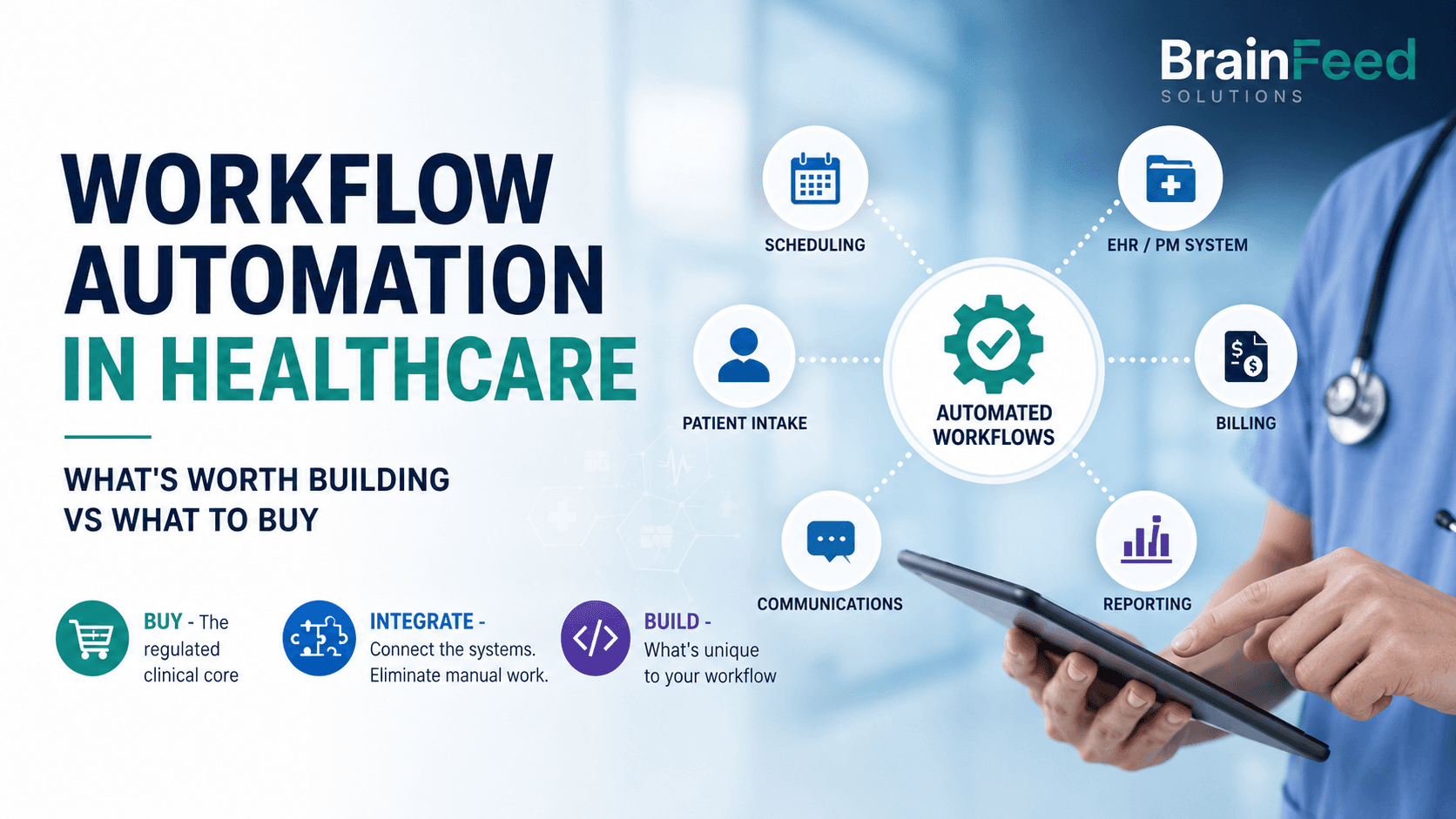
TL;DR - The build-vs-buy question in healthcare is actually a three-way choice: buy the regulated clinical core, integrate the connective tissue between systems, and build only the workflow-specific pieces no suitable vendor provides. Don't build your own practice-management system or EHR - buy a vetted one. Do build the integrations, intake routing, and document pipelines that off-the-shelf tools leave as manual work, because that connective layer is where the admin hours actually leak. Every decision runs through one filter first: does this process touch patient data, and can every tool and data flow in the chain meet the applicable privacy, security, contractual, and regulatory requirements?
Most healthcare operations don't have an automation problem. They have an integration problem wearing an automation costume.
The practice already bought the scheduling tool, the practice-management system, the billing platform, and the patient-communication add-on. Each one automates something. None of them talk to each other. So a staff member re-keys the same patient details across three systems, copies referral data into a template by hand, and chases no-shows from a spreadsheet. That's not a missing feature - it's the gap between features that nobody sold them.
This article is about that gap: which parts of a healthcare workflow are worth buying off the shelf, which are worth building, and how to tell the difference before you spend money on either.
This article is for:
- Clinic owners, practice managers, and allied-health or NDIS providers drowning in admin who suspect automation could help but don't know where it pays off
- Operations leads evaluating a stack of point-solution SaaS tools that each solve 80% of one job
- Founders building healthcare or care-sector products who need to decide which regulated infrastructure to license and which differentiated workflow layer to own
This article is NOT for:
- Anyone shopping for a specific EHR or practice-management product - this is about the workflow around those tools, not which one to license
- A compliance or legal guide - we flag where regulation shapes the decision, but your obligations are jurisdiction-specific and this is not legal advice
- Hospitals with an internal integration engine and a HL7/FHIR team already - your build-vs-buy calculus is a different article
The real question: buy, integrate, or build
"Build vs buy" is the wrong framing for healthcare because it hides the option that saves the most time. There are three doors, not two.
Buy the regulated, standardised, high-stakes core. Clinical records, e-prescribing, patient portals, appointment scheduling, claims and billing - these are mature, heavily regulated categories where a vendor has already absorbed the compliance cost, the edge cases, and years of clinical feedback. Building your own is almost always a mistake. You would be recreating a mature product while taking on the security, maintenance, clinical-safety, and regulatory work that an established vendor has already invested heavily in - and buying does not outsource your own compliance obligations, it just spares you rebuilding the regulated product layer from scratch. This is where most workflow automation in healthcare should stop trying to be clever: license the core, don't reinvent it.
Integrate the tools you've bought so they stop creating manual work at the seams. This is the door most practices don't know exists. It uses a low-code workflow automation tool - Make, Zapier, or n8n - plus custom code where the low-code platform runs out of road, to move data between systems, trigger actions, and remove the copy-paste tax. Most of the admin savings in a healthcare practice live here, not in a shiny new app.
Build only the workflow-specific pieces that no vendor sells because they're specific to how you work: an intake-routing rule set for your referral sources, a report generator for your particular NDIS or care-plan format, an internal dashboard that reflects your actual operating model.
The mistake that wastes the most money is buying a second, third, or fourth point solution to paper over the integration gap - when the fix was to connect the tools you already have. The mistake that wastes the most time is building the connective layer by hand, every day, in a human's working memory.
| Decision | Use it when | Typical examples |
|---|---|---|
| Buy | The category is standardised, regulated, and mature | EHR, e-prescribing, billing, telehealth |
| Integrate | Manual work happens between systems you already own | Intake-to-PMS flow, reminders, reconciliation |
| Build | The workflow is specific to your operating model | Routing rules, internal dashboards, custom reports |
What most healthcare providers should buy, not build
Some things in healthcare are a buy decision, full stop, because the cost of getting them wrong is measured in patient safety or regulatory exposure:
- Clinical records / EHR / practice-management systems (Cliniko, Halaxy, Nookal, Cerner, Epic, and the like). These carry clinical-safety and data-residency obligations you do not want to own.
- E-prescribing and medication management. Regulated, integrated with pharmacy networks, not a DIY target.
- Patient portals and telehealth. Buy a platform that can support your applicable security, privacy, and regulatory requirements; the security surface is too large to hand-roll.
- Claims, billing, and payments (Medicare / bulk-billing flows in AU, insurance clearinghouses in the US). Vendors keep pace with rule changes so you don't have to.
The test is simple: if a category is standardised across the industry and a mature vendor has priced the compliance in, buy it. Your competitive advantage is never your billing engine.
Where off-the-shelf breaks in healthcare
Bought tools break in predictable places, and the breaks are where automation earns its keep:
At the seams between systems. Your intake form doesn't push into your practice-management system. Your PMS doesn't sync to your CRM. Your billing export needs manual reconciliation against your calendar. Each seam is a daily manual task disguised as "just how the software works."
When the tool forces its workflow onto yours. Off-the-shelf software encodes the average customer's process. An NDIS provider, a multi-site allied-health group, and a solo GP have genuinely different operating models. When the tool can't bend, staff invent shadow processes - spreadsheets, folders, and sticky notes - to bridge the gap. Those shadow processes are automation candidates.
On the long tail your vendor won't prioritise. The report your funder requires in a specific format. The three referral sources that each send data differently. The follow-up sequence that's specific to your patient cohort. No vendor builds these because they don't generalise - which is exactly why they're worth building for you.
What's actually worth automating
The most valuable medical practice automation usually sits around care delivery rather than inside the clinical decision itself. In healthcare admin, a short list of processes drives most of the recoverable time. These are the ones to prioritise:
Patient intake and enquiry routing. New enquiries arrive by phone, form, and email, then get triaged, categorised, and routed to the right person or waitlist by hand. This is one of the highest-return automations in a clinic. In one anonymised BrainFeed healthcare engagement, AI-assisted intake and routing recovered roughly eight hours per week for the team involved - a single staff member's day, back every week.
Appointment reminders and no-show recovery. Automated, personalised reminders across SMS and email, with rebooking links and a follow-up loop for no-shows. Off-the-shelf reminder tools exist, but they rarely close the loop back into your calendar and waitlist - which is the part worth building.
Referral and document processing. Inbound referrals extracted and filed against the right patient record; outbound documents - care plans, NDIS progress reports, discharge summaries, letters - generated from data you already hold instead of retyped. In a separate anonymised BrainFeed professional-services engagement, a templated document pipeline reduced preparation time per matter by around 70%. Healthcare documentation uses similar workflow mechanics, although the outcome should not be assumed to transfer directly.
Data entry across systems. One of the most common time leaks: the same patient details, keyed into intake, then the PMS, then the CRM, then billing. Automating the flow once removes the error rate and the hours in one move.
Billing reconciliation and reporting. Matching appointments to claims to payments, and assembling the compliance and management reports your practice runs on a schedule.
Notice what these have in common: none of them is a clinical decision. They're the administrative wrapper around care. That's the safe, high-return zone for healthcare automation - the paperwork, not the medicine.
The compliance filter you run first
Before any of the above, one question gates the whole decision: does this process touch patient data, and can every tool and data flow in the chain meet the applicable privacy, security, contractual, and regulatory requirements?
Healthcare data is regulated everywhere BrainFeed works, and the specifics shape what you're allowed to automate and how:
- United States: HIPAA applies to covered entities and business associates handling protected health information. A vendor that creates, receives, maintains, or transmits ePHI on your behalf generally needs an appropriate Business Associate Agreement and must meet the applicable HIPAA requirements.
- Australia: private-sector health service providers are generally covered by the Privacy Act 1988 and the Australian Privacy Principles, including many small providers. State or territory privacy and health-records laws may add requirements. My Health Record rules apply where the workflow interacts with that system, and registered NDIS providers must also meet the relevant NDIS Practice Standards.
- United Kingdom: health information is special-category data under UK GDPR and the Data Protection Act 2018. Organisations that access NHS patient data or systems must also complete the Data Security and Protection Toolkit assessment.
The practical consequences for automation design:
Platform suitability depends on the data, jurisdiction, plan, contract, and configuration. Security certifications alone do not make a particular workflow compliant. For example, Zapier currently states that HIPAA-regulated PHI is not supported on its platform and that it does not sign BAAs. For every platform in the chain, verify the contractual terms, connector behaviour, subprocessors, log retention, data residency, and deletion controls before regulated data is introduced. Where a hosted connector can't meet those terms, the alternative is custom code or self-hosting - which shifts the control to you but does not remove the work (more on that below).
Audit trails and access control are part of the spec, not extras. Who triggered what, when, and what data moved - a healthcare automation has to answer that by design.
"Where does the AI send this?" is a compliance question. More on that next.
This is the single biggest reason healthcare automation is not a DIY weekend project with a consumer no-code tool. The workflow is simple; the data-handling is not.
Low-code vs custom code: where the line sits
A low-code workflow automation tool can be the right starting point for non-regulated, de-identified, or otherwise appropriately controlled healthcare administration. Connecting approved systems through an API, triggering a reminder, or routing operational data can often be handled quickly and economically with low-code, and your team can often adjust it themselves afterward. The specific platform still has to be suitable for the data, jurisdiction, contract, and workflow involved.
Depending on those requirements, the implementation might use Make, n8n, another approved orchestration platform, or custom code. Zapier can support healthcare-related workflows that do not involve PHI, but it should not be used for HIPAA-regulated PHI under its current terms.
Reach for custom code when:
- Patient data needs to stay inside a controlled boundary. Self-hosting n8n can keep workflow execution data and logs inside infrastructure you control, but it does not make the workflow compliant by itself. The hosting environment, any downstream APIs, encryption, access controls, retention, backups, audit logs, and vendor agreements all remain part of the compliance design.
- The logic is genuinely complex - conditional routing with many branches, data transformation the low-code platform can't express, or a volume that makes per-task pricing absurd.
- You're building an internal tool, not just a pipe - a dashboard, an admin panel, a report generator with a real interface.
Most real healthcare projects are a blend: low-code for suitable orchestration, custom code where data boundaries or complex logic require tighter control, and AI only for clearly bounded language or extraction tasks. Anyone who tells you it's all one or all the other is selling their comfort zone, not your solution.
AI-powered workflow automation: where it helps, where it's a liability
AI-powered workflow automation is the phrase of the moment, and in healthcare admin it earns its place in specific spots: reading and extracting data from unstructured referrals and documents, drafting routine correspondence, categorising and routing inbound enquiries, and summarising notes into a structured format. These are language tasks with a human check at the end - a good fit for large language models.
AI becomes high risk when an unvalidated output can trigger a clinical or otherwise consequential action, when a confident-but-wrong output can reach a patient unchecked, or when regulated data leaves the approved environment. Note the distinction: plenty of safe administrative systems act on patient data without a person approving each event - reminders, record synchronisation, access-controlled routing, deterministic billing - because the logic is deterministic and auditable. The problem is not automation acting on data; it's an unreliable AI output causing a consequential action without adequate validation or controls. The rule we hold to is that AI is a tool, not magic - use it where it genuinely helps and avoid it where it does not.
A safer pattern: AI does the first draft or the triage; a person approves before anything consequential happens; and the whole path stays inside compliant, agreement-backed services. Human review reduces risk, but it does not replace access controls, auditability, output validation, retention controls, and appropriate vendor agreements.
A decision framework you can run this week
For each manual process eating your team's time, score it against five questions. The processes that pass are your automation shortlist, in order:
- Is it repetitive and rule-based? (High volume, low judgement = strong candidate.)
- Does a mature vendor already sell a product that can support the applicable clinical, security, and regulatory requirements? (If yes, buy it - don't build.)
- Does it live in the gap between tools you already own? (If yes, integrate - the highest-return zone.)
- Does it touch patient data? (If yes, compliance shapes the whole build - price that in.)
- How many hours a week would it give back? (Below an hour, deprioritise; several hours, move it up.)
A process that is repetitive, sits in a seam, gives back real hours, and either avoids PHI or can be built compliantly is exactly what you automate first. A process that's really a clinical judgement, or that a vetted vendor already handles, is not.
What it costs and when it pays back
Based on BrainFeed's current project scoping: a focused single-workflow build - one specific workflow, one integration - typically starts around US$3,000 to US$8,000. Larger multi-integration and AI projects scale from there, and ongoing retainers for monitoring and iteration start around US$1,500/month. A typical project takes four to eight weeks end to end.
The payback maths is usually straightforward. If an automation gives back 5 to 15 hours a week across the staff it touches, most projects cover their cost in saved time within six months - and unlike a new hire, the automation runs 24/7 with monitoring, error handling, and alerts when something breaks. The point isn't to replace people; it's to stop paying skilled clinical and admin staff to do data entry. These are BrainFeed project ranges and anonymised client outcomes, not guaranteed industry-wide benchmarks.
The honest version
The reason workflow automation in healthcare gets oversold is that "automate everything" is an easier pitch than "connect the four tools you already own and build the two things nobody sells you." But the second version is what actually recovers hours. Buy the regulated core. Integrate the seams. Build only what's specific to you. Run every piece through the compliance filter first. Do that, and automation stops being a buzzword and becomes what it should be - your team's week, handed back.
If you want a senior team to map your workflow, flag the compliance constraints, and quote the build-versus-buy line for your specific practice, see how BrainFeed approaches workflow automation and integration. For the systems-and-data side of a larger build, our SaaS engineering work covers the custom pieces.
FAQ
What is workflow automation in healthcare?
It's using software to remove repetitive administrative work around patient care - intake and enquiry routing, appointment reminders and no-show recovery, referral and document processing, cross-system data entry, and billing reconciliation. The goal is to hand back staff hours on the paperwork surrounding care, not to automate any clinical decision. Most of the practical value comes from connecting the systems a practice already uses so they stop generating manual work at the seams.
Should I buy healthcare automation software or build a custom solution?
Both, deliberately. Buy the regulated core - clinical records, e-prescribing, patient portals, scheduling, billing - because vendors have absorbed the compliance and clinical-safety cost. Build (or integrate with a low-code tool plus custom code) the connective layer between those systems and the workflow-specific pieces no vendor sells, such as your intake-routing rules or your funder's report format. Buying a second point solution to cover an integration gap is usually the expensive mistake.
Is it safe to use tools like Zapier or Make with patient data?
Only if the entire data path is compliant. Generic connectors that log payloads, or AI services that retain data for training, can put you offside with HIPAA, the Australian Privacy Principles, or UK GDPR. Patient data should only flow through services covered by the right agreements, and for stricter control that often means self-hosted n8n or custom code rather than a public cloud connector. Audit trails and access control belong in the spec from the start.
Where does AI genuinely help in healthcare admin?
AI is most useful for bounded language and extraction tasks: reading unstructured referrals, drafting routine correspondence, categorising enquiries, and turning notes into structured formats. It should not make clinical decisions or allow an unvalidated output to trigger a consequential action. A safer pattern is for AI to prepare a draft or recommendation, with human review where the consequence warrants it, inside an approved data environment with appropriate validation, auditability, access controls, retention settings, and vendor agreements.
How much does a healthcare automation project cost?
A focused single-workflow build typically starts around US$3,000 to US$8,000, with larger multi-integration or AI projects scaling from there and ongoing retainers from around US$1,500/month. Most projects take four to eight weeks and pay for themselves in saved time within six months when they give back 5 to 15 hours a week across the staff they touch.